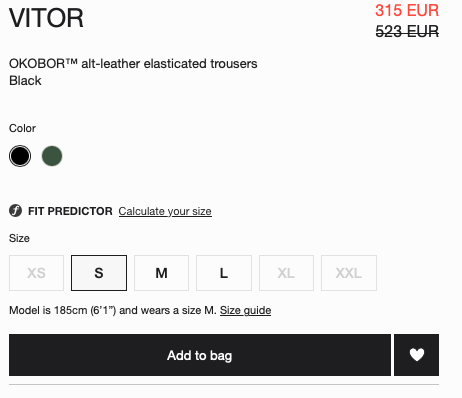
How to add whistlist icon beside add to cart button in MINIMOG THEME
site link - https://next.minimog.co/collections/best-sellers/products/slim-high-ankle-jeans
Sample like this
A user seeks to add a wishlist icon next to the “Add to Cart” button on product pages in the Minimog theme.
Proposed Solutions:
Manual Code Edit: One response suggests locating the product template file (product-template.liquid), finding the “Add to Cart” button code, and inserting custom HTML/CSS markup to display a wishlist icon beside it.
App Integration: Another user recommends installing the Wishlist Hero app from the Shopify App Store as an alternative solution.
The discussion remains open with no confirmation of which approach was implemented or whether the issue was resolved. The conversation includes technical steps for theme customization but lacks complete code examples due to formatting issues in the original posts.
How to add whistlist icon beside add to cart button in MINIMOG THEME
site link - https://next.minimog.co/collections/best-sellers/products/slim-high-ankle-jeans
Sample like this
Locate the product template: In the theme editor, navigate to the “Sections” directory and open the “product-template.liquid” file.
Find the “Add to Cart” button code: Look for the code that generates the “Add to Cart” button. It may look like this:
I hope you are doing good and welcome to the Shopify Community!
I am San from MS Web Designer.
You can use this app:
https://apps.shopify.com/wishlist-hero
Regards,
San