Hi everyone
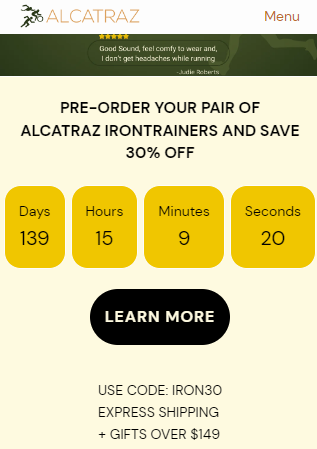
I have a super small issue that is probably really easy to fix but it’s outside my scope of understanding. I’m using Bullet theme and on desktop view the countdown timer looks great but I’d love for the heading to be centred on mobile. Can anyone help with this quick fix please?
Hello @DaveyAlcatraz
You can add code by following these steps
-
Go to Online Store → Theme → Edit code.
-
Open your theme.liquid file
-
Paste the below code before on theme.liquid
@media screen and (max-width: 767px){
.meta x-cell h2 {
text-align: center;
}
}
Was my reply helpful? Click Like to let me know!
Was your question answered? Mark it as an Accepted Solution.
Hi
Thanks for that, just to clarify which body should I past it before? I pasted it at the third ‘body’ and it didn’t work, the code was visible just above my announcement bar on mobile view… Please advise
search in file through the keyboard ctrl+f and search tag then above the paste it you can also add this in css file.
You can add code by following these steps
-
Go to Online Store → Theme → Edit code.
-
Open your theme.liquid file
-
Paste the below code before on theme.liquid
@media screen and (max-width: 767px){
x-cell.meta x-cell h2 {
text-align: center;
}
}
Was my reply helpful? Click Like to let me know!
Was your question answered? Mark it as an Accepted Solution.
1 Like
Hi, thanks for the response. Just one line above? I’ll try it now and see how I go..
Perfect, that looks great. The only other thing I noticed is it does have an uneven amount of padding on the top as the bottom. Is there any way the padding after the text below could be the same as the padding at the top?
can you share screenshot of that section?