Hey guys, I want to make the compared price and the normal price the same size and change the appearance to the one sent as reference here.
I would be happy if anyone has a solution for that. 
Current state:
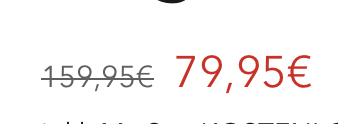
Reference:
Hey guys, I want to make the compared price and the normal price the same size and change the appearance to the one sent as reference here.
I would be happy if anyone has a solution for that.
Current state:
Reference:
Hi @MS-Ecom2024
Would you mind to share your Store URL website? with password if its unpublish. Thanks!
Can I send it to you privatly?
Yes, sure,.
Hi @MS-Ecom2024
Thanks, like this right?

If it is check this one.
From your Shopify admin dashboard, click on “Online Store” and then “Themes”.
Find the theme that you want to edit and click on “Actions” and then “Edit code”.
In the “Assets” folder, click on “base.css, style.css or theme.css” file, depending on which file your theme uses to store its CSS styles. At the bottom of the file, add the following CSS code:
span.price.price--compare {
  font-size: 22px !important;
}
And Save.
The size that i used is from the original price size.
Please don’t forget to Like and Mark Solution to the post that helped you. Thanks!
Hey, thank you! The Code you’ve sent works perfectly on desktop but is too big on mobile view. If you can fix that for me, I would be really happy!
Hey, thank you! The Code you’ve sent works perfectly on desktop but is too big on mobile view. If you can fix that for me, I would be really happy!
Hey @MS-Ecom2024
You can add this code in end of theme.liquid file, it should work for you
If I managed to help you then, don’t forget to Like it and Mark it as Solution!
Best Regards,
Moeed
