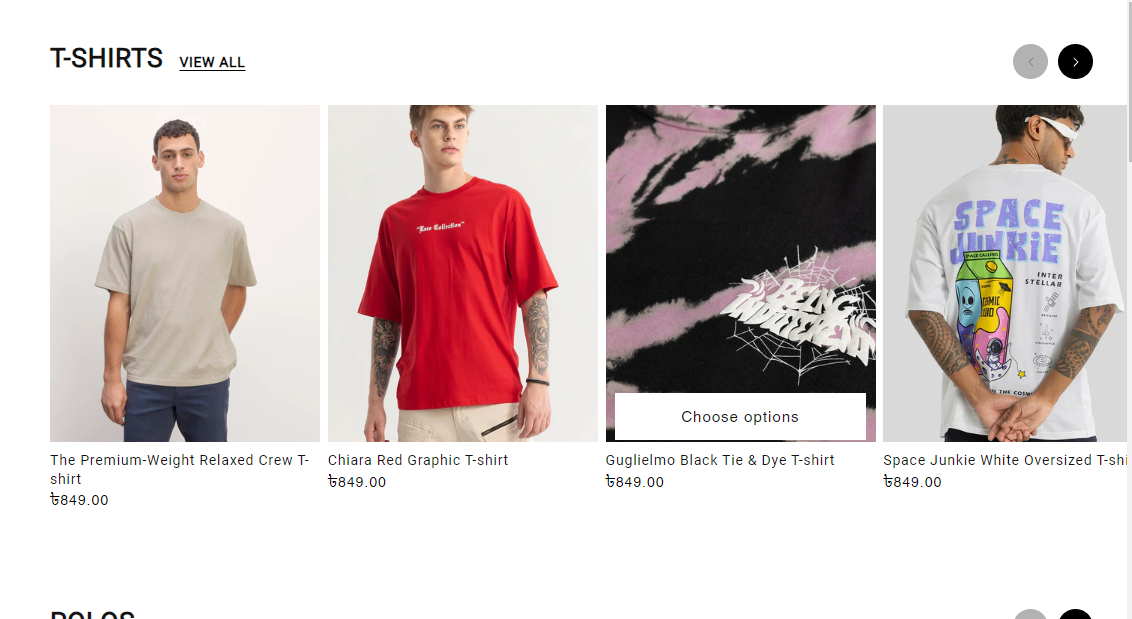
I used this code but the images are going eachother like this

.collection .card__inner {
width: 348px;
height: 464px;
}
I used this code but the images are going eachother like this
.collection .card__inner {
width: 348px;
height: 464px;
}
@NOT1 , try this one
.contains-card--product li {
    width: 348px!important;
    height: 464px!important;
}
Result:

Its looking like this now the price in hidden
@BSSCommerce-B2B are u there?
@NOT1 , change the previous code like this
.contains-card--product li {
    width: 348px!important;
    max-width: 348px!important;
}
.collection .card__inner {
    height: 464px!important;
    max-height: 464px!important;
}
.collection slider-component ul {
    overflow: hidden;
    max-height: 500px!important;
    height: 500px!important;
}
@NOT1 , Yes i’m here to help you 
Thanks Its solved
@NOT1 , Glad to help you. Feel free to ask if you encounter any issues