It won’t let me delete this order. We are still in VERY beginning stages–No PayPal account is set up. How do we delete this freaking thing?? There’s no red “Delete” button in the bottom right, even though the Order is cancelled.

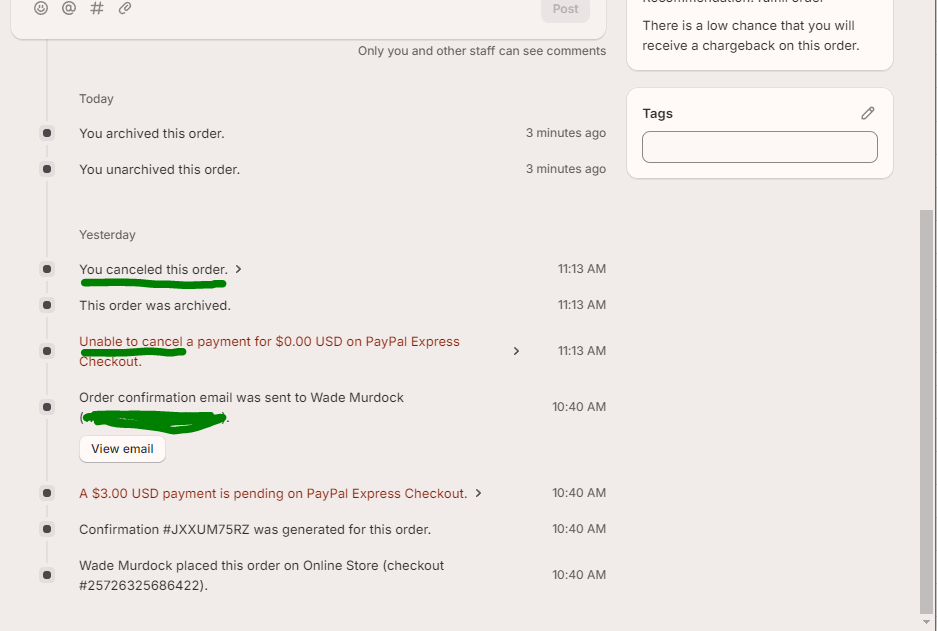
You would of had to setup PayPal first, before refunding the order, which is why the order ‘cancellation’ didn’t work, as you’re not actually synced up to PayPal yet. If you setup PayPal as a payment gateway, then you should be able to do the refund/cancellation again, to get your $3 back.
But even if you do set up PayPal, and successfully cancel/refund the order, you wouldn’t be able to ‘delete’ the order entirely from the back-end admin. Any time that money gets processed by a payment gateway, the option to ‘delete’ the order goes away, as Shopify needs to keep the order details in the back-end so that if there any disputes, there can be a record of the order/payment to reference.
https://help.shopify.com/en/manual/orders/cancel-delete-order#delete-an-order
Only the following types of order can be deleted:
- orders that were paid with a manual payment method
- orders that started as a draft and were then marked as paid
- test orders that were paid with the Bogus Gateway, or with Shopify Payments in test mode
- orders that were imported through the Shopify API
1 Like
You would of had to setup PayPal first
That’s exactly what I was afraid of.
But even if you do set up PayPal, and successfully cancel/refund the order, you wouldn’t be able to ‘delete’ the order entirely from the back-end admin.
Oh no! I’ve already marred our backend with garbage data before we’ve even started. What a tragedy…
Great answer. This is a good first impression to Shopify’s support…