How to display messages in the cart for only specific products?

Topic summary

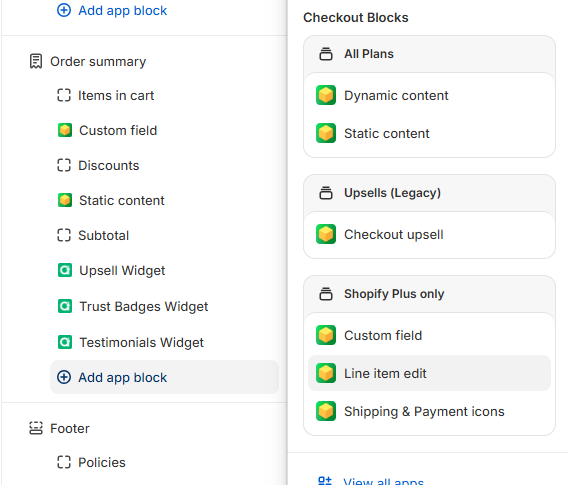
A Shopify Plus user needs to display custom shipping surcharge messages (+$15 or +$25) on specific line items during checkout based on product SKUs. They attempted using Checkout Blocks but encountered issues—the block doesn’t appear after being built, and “Line Item Content” isn’t available as an option, only “Line Item Edit.”

Proposed Solutions:

  • Implement conditional logic to check if products belong to specific categories, then display corresponding messages
  • Reference a YouTube tutorial demonstrating similar functionality

Status: The issue remains unresolved with no confirmation whether the suggested approaches successfully addressed the checkout customization problem. Screenshots show the user’s attempts to configure checkout blocks in the Shopify editor.

Summarized with AI on October 28. AI used: claude-sonnet-4-5-20250929.

My company is on Shopify plus. I have two groups of items that incur additional shipping costs when the shipping is calculated. There is a +$15 group of products and a +$25 group of products.

Is there a way to create a custom message to show up in the checkout on each line item that is one of those products?

For example, if product is SKU 12345, 12346, or 12347, then display message “+$15 Additional shipping for oversize items has been applied”.

It seems like I should be able to do this with Checkout Blocks, but when I try to add the block to my checkout editor after I have it built, nothing happens. Can anyone provide me support on this?

I also notice, when trying to add the “Line Item Content” to the checkout page, there is no option for that, just the “Line Item Edit”. Is that the problem?

@jobrien - you can try coding to check if a product belongs to this specific category, if yes then display this text you want or else no text would be shown.

Hi @jobrien ,

Please refer the video below to implement the same.