Hello everyone!
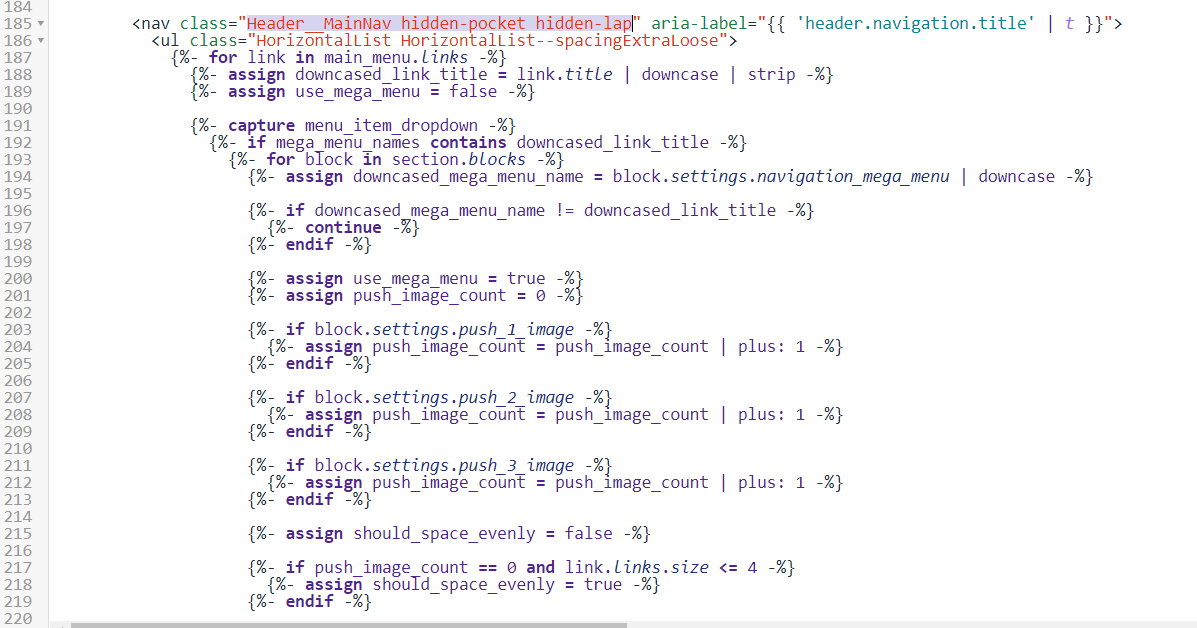
Recently, I have a client that demands a change in the navigation bar for their navigation bar. Because I am relatively new to Shopify Liquid, I am having troubles with finding the place to edit the code. Here are the pics of the beginning of the Navigation bar and the part that I want to make changes. There are 5 links in the navigation bar and I have to make changes in the second one. However, there is only one
tag in front of me. How can I find the source of this nested code in order to edit?
Thanks in advance!
{% for link in main_menu.links %}
  {% if forloop.index == 2 %}
    ... changed code
  {% else %}
    ... default code
  {% endif %}
{% endfor %}
The liquid code loops through all the links/sublinks/etc. in the menu and outputs that code. That’s why there’s only 1
. If you need to target the 2nd link, you can do something like this:
{% for link in main_menu.links %}
  {% if forloop.index == 2 %}
    ... changed code
  {% else %}
    ... default code
  {% endif %}
{% endfor %}
Though if your client reorders the links, your change would still apply to the 2nd link, and maybe not the intended link. Might be better to look for the link title, then it doesn’t matter in what position that link is in.
{% for link in main_menu.links %}
  {% if link.title == "My Link Title" %}
    ... changed code
  {% else %}
    ... default code
  {% endif %}
{% endfor %}