Good day!
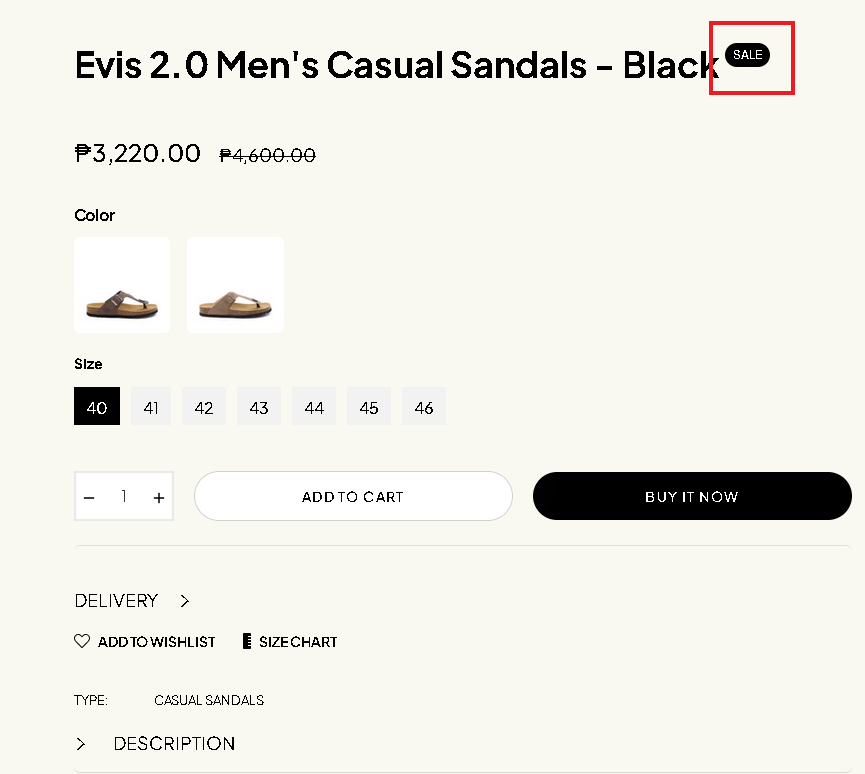
How to edit the Sale word on the product page to percentage?
Thank you!
A Shopify store owner wants to replace the \
Good day!
How to edit the Sale word on the product page to percentage?
Thank you!
@smsigroup You have to add the code in the product template file, find the sale tag code and place the below code
{% if product.compare_at_price_max > product.price %}
  {% assign discount_percentage = product.price | times: 100.0 | divided_by: product.compare_at_price_max | minus: 100.0 | abs %}


Your save tag code or text {{ discount_percentage | floor }}%

{% endif %}
that’s it now instead of sale badge it will show the percentage of save!
Hello @smsigroup
It usually requires editing your theme’s code to change the “Sale” word on the product page to show a percentage Usually, this is in a file called product.liquid or product-template.liquid. You must edit the code to change the phrase “Sale” to the percentage discount when you’ve found the appropriate one.
Hi @smsigroup
From your Admin page, go to Online Store > Themes > Click the three dots > Edit default theme content
Under the Search bar, type Sale
Look for the work Sale inside the textbox
Change the word and SAVE
Please don’t forget to Like and Mark Solution to the post that helped you. Thanks!
Thank you for the reply.
Theme settings setup;
Tag Sale Product: %
in the product list view it shown the percentage of the discount, but in the product view it shown the Sale word instead of the percentage discount.
Product list view;
Product view;
Thank you!
@smsigroup You have to find out the correct product template then apply my code then it will show % instead of Sale word in product view layout.
# {{ product.title }}<sup>
{% if product.compare_at_price_max > product.price %}
{% assign discount_percentage = product.price | times: 100.0 | divided_by: product.compare_at_price_max | minus: 100.0 | abs %}
Your save tag code or text {{ discount_percentage | floor }}%
{% endif %}
{{ 'products.product.on_sale' | t }}
</sup>
this is the result
@smsigroup Just remove the red box code (see screenshot) and replace the code with the below code
{% if product.compare_at_price_max > product.price %}
  {% assign discount_percentage = product.price | times: 100.0 | divided_by: product.compare_at_price_max | minus: 100.0 | abs %}

    {{ discount_percentage | floor }}%

{% endif %}
save and check it will resolve your all issues and let me know if works!
Thank you very much for your help.