Hello
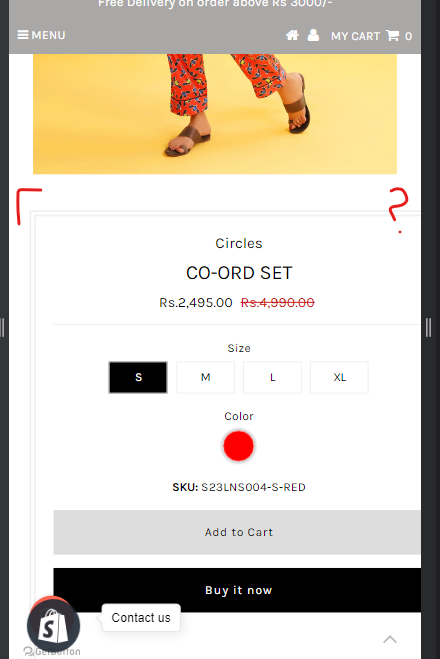
I’m currently using the Testament theme, and I’m facing alignment issues on my product pages. I would greatly appreciate any suggestions or solutions to this problem.
I’ve tried searching for solutions online, but all the suggestions I found involved adding code to the theme.css or base.css files. However, I couldn’t locate these specific files in my code.
If anyone has encountered a similar issue or knows an alternative way to fix alignment problems on product pages, I’d be very grateful for your assistance. Thank you in advance for your help.
From your Shopify admin dashboard, click on “Online Store” and then “Themes”.
Find the theme that you want to edit and click on “Actions” and then “Edit code”.
In the “Assets” folder, click on “base.css, style.css, theme.css or stylesheet.css” file, depending on which file your theme uses to store its CSS styles. At the bottom of the file, add the following CSS code:
And Save.
@media only screen and (max-width: 739px){
div#product-right {
    width: 86% !important;
}
}
@media screen and (min-width: 980px){
.gridlock .row .desktop-7 {
    width: 50.25%;
}
}