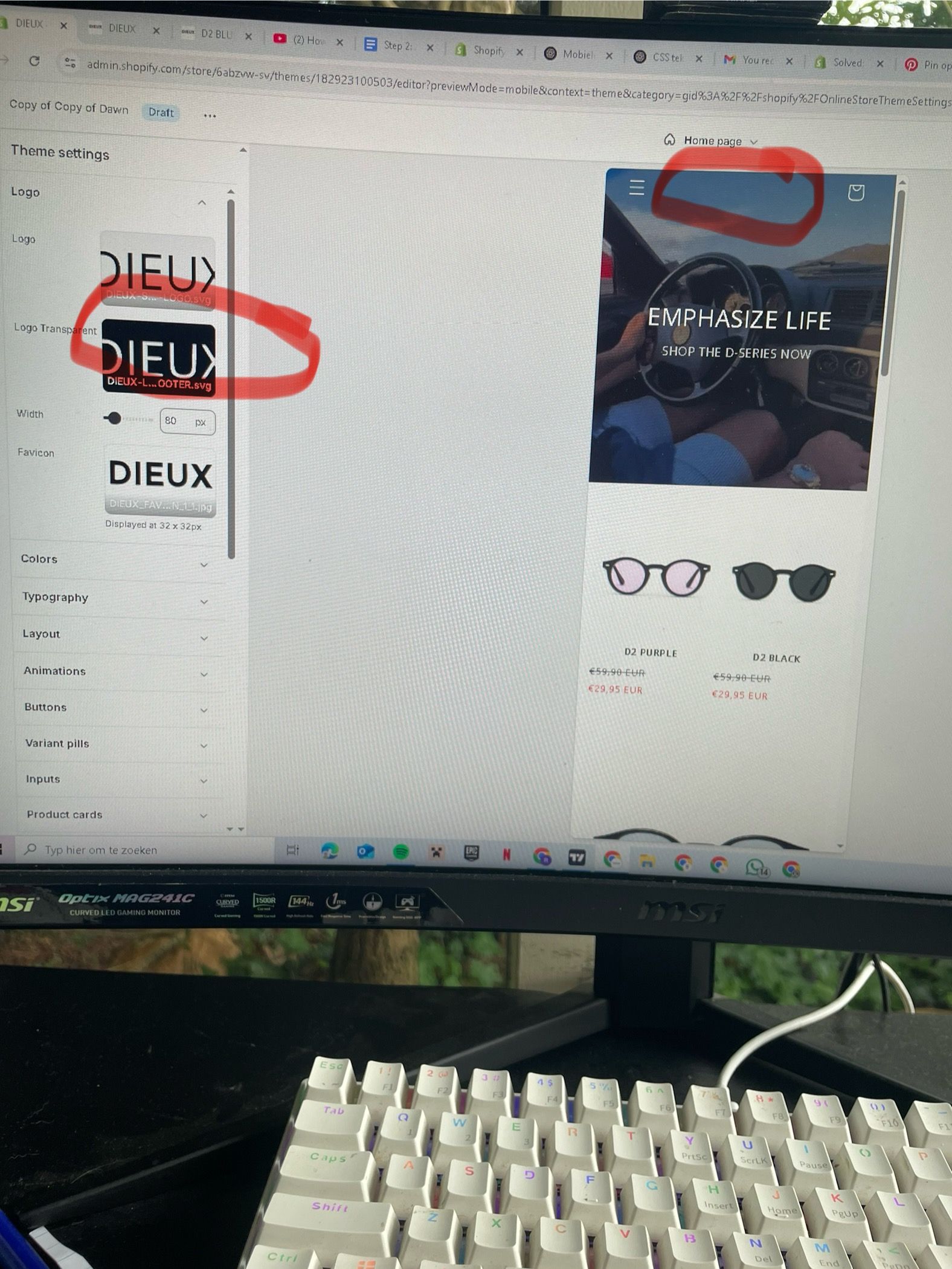
How to fix transparant header logo not uploading

Topic summary

A user is experiencing an issue where their transparent header logo fails to display after uploading.

Troubleshooting suggestions provided:

  • Verify the logo file format and integrity
  • Check theme header settings for a dedicated “Transparent Header Logo” or “Logo for transparent background” field (distinct from the standard logo upload)
  • Confirm transparency mode is enabled in theme settings
  • Review logo visibility configurations

Current status:

  • One community member requested the website URL to diagnose the issue
  • Another offered direct code-level support if needed
  • The issue remains unresolved and awaiting further information from the original poster
Summarized with AI on October 27. AI used: claude-sonnet-4-5-20250929.

Hey there,

My transparant logo header doesn’t show up when it’s uploaded. Can someone please help me?

Hi,

Hope this will work

  • Make Sure Your Logo File is Okay
  • Check Theme Header Settings: Look for a setting like “Transparent Header Logo” or “Logo for transparent background” Upload your logo in this section (not the normal logo section)
  • Check Transparency Mode is On
  • Check Logo Visibility

@dieuxstudios can you please share your website link?

Hi, @dieuxstudios

I can support you. But it needs to check the theme code. If you need my help, please let me know.