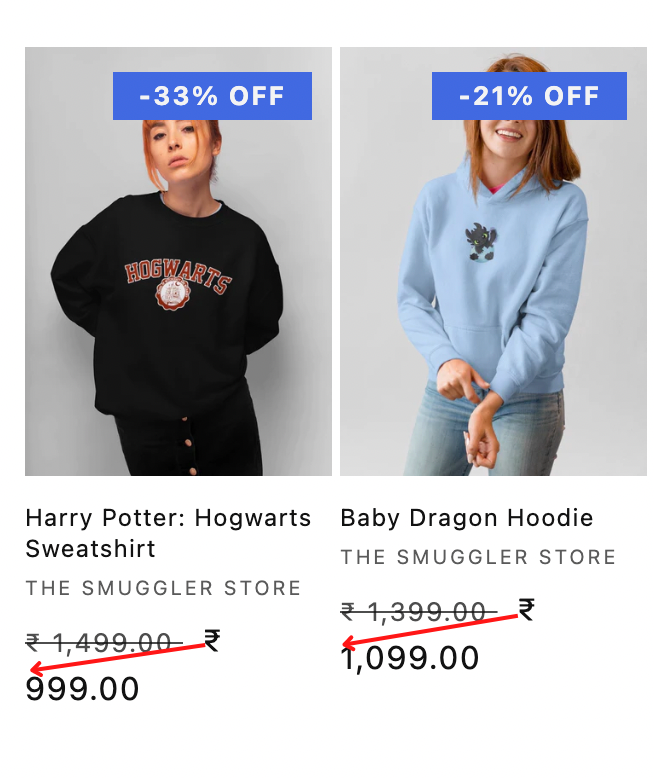
Hey, how to get the currency symbol below the discounted price in featured collection section dawn theme.
Hello @suryagoswami7 ,
Could you please share your store url ( with pass if your store password is enabled ) then I can see and suggest something for you? 
Best regards,
GemPages Support Team
sure!
Hello @suryagoswami7
You can follow these steps:
- Go to Online Store->Theme->Edit code

- Open your theme.liquid file, paste the below code before

I hope the above is useful to you.
Kind & Best regards,
GemPages Support Team
hey @GemPages ,
Thank you soo much it worked perfectly!
Hey, There is a issue after applying this code. The product which are not on sale are showing the price 2 times please help.

Hey @GemPages , Please help me fix this issue. Thanks in advance.
Hello @suryagoswami7
Sorry about the above issue and the time zone difference caused me to reply late. You can use this code instead of the code I sent above:
.collection .card-information>.price > .price__container > div >span {
    width: 100%;
    display: inline-block;
}
I hope the above is useful to you.
Kind & Best regards,
GemPages Support Team
Hey @GemPages , Thanks for replying, should i paste this code in the theme.liquid file itself?
Hello @suryagoswami7
That’s right, you use the code I just submitted instead of the old one. Similar to the photo:

Kind & Best regards,
GemPages Support Team
Thank you @GemPages for helping me out.
Hello @suryagoswami7
Happy designing and do not hesitate to raise your concerns up if any, we are always willing to assist you.
Kind & Best regards,
GemPages Support Team
1 Like