Hello,
How can I hide a section in Desktop but keep enabled on mobile?
DAWN theme.
The Section is Multicolumn, on the Home page.
I believe this is the ID: shopify-section-template–17621732491523__multicolumn_RG4RWg
Here is the link to the demo site and the section is located at the bottom above the footer titled ALL ABOUT US (8 images on top of each other):
You can try this code by following these steps:
Step 1: Go to the online store ->Theme ->Edit Code.
Step 2: Find the theme.liquid file and add the following code above the tag
Hopefully it will help you. If yes then Please don’t forget hit Like and Mark it as solution!
Thanks but this hides all Multi columns!
I only want 1 multi column hidden, which is (I think)
shopify-section-template–17621732491523__multicolumn_RG4RWg
Can you help with this?
Okay. got it.
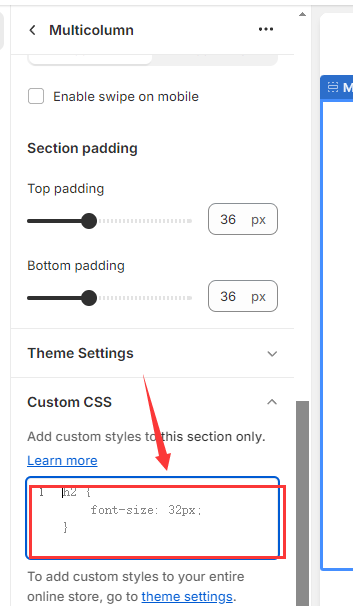
Step 1: Go to the online store ->Theme ->Customize.
Step 2: Find the multi column you want hidden and add the code to custom css box
@media screen and (min-width: 750px) {
    .multicolumn {
        display: none;
    }
  }
Hopefully it will help you. If yes then Please don’t forget hit Like and Mark it as solution!
Sorry which file should this code be added to?
Section-multicolumn.css ?
And where would the code be placed?
1 Like