I want to hide this text “Subscribe and save 10%”
Topic summary
A user seeks to remove the “Subscribe and save 10%” text from their Shopify product page. Two solutions have been provided:
Solution 1 (Tech_Coding):
- Navigate to Online Store → Theme → Edit code
- Open theme.liquid file
- Add CSS code before the
</body>tag to hide the subscription label while keeping other elements visible
Solution 2 (Made4uo-Ribe):
- Access Online Store → Themes → Edit code
- Locate base.css, style.css, or theme.css in the Assets folder
- Add CSS targeting the specific subscription fieldset label with
display: none !important;
Both approaches use custom CSS to hide the unwanted text element. Screenshots demonstrate the expected results after implementation. The issue appears resolved with multiple working options provided.

1 Like
Hello @hem0903
You can add code by following these steps
-
Go to Online Store → Theme → Edit code.
-
Open your theme.liquid file
-
Paste the below code before on theme.liquid
RESULT:

my reply helpful? Click Like to let me know!
your question answered? Mark it as an Accepted Solution.
Hi @hem0903
Try this one.
- From your Shopify admin dashboard, click on “Online Store” and then “Themes”.
- Find the theme that you want to edit and click on “Actions” and then “Edit code”.
- In the “Assets” folder, click on “base.css, style.css or theme.css” file, depending on which file your theme uses to store its CSS styles. At the bottom of the file, add the following CSS code:
fieldset.shopify_subscriptions_fieldset > div > .shopify_subscriptions_app_block_label:nth-child(2) > div > label {
    display: none !important;
}
- And Save.
- Result:
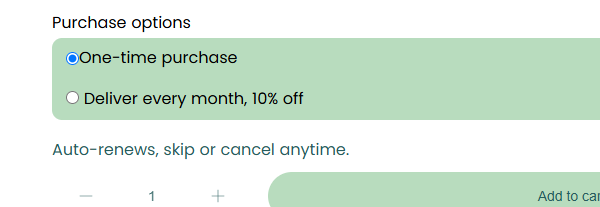
Your Feedback Matters! Please mark the solution and give likes to posts that helped you. Your appreciation fuels our motivation to assist you better!