Hi everyone,
I am trying to figure out how to implement member pricing on my Shopify store similar to what is shown on this product page:
I’ve looked into different apps but haven’t found a clear solution that fits my needs. I’ve tried some options, but they haven’t worked out. Can anyone recommend the best app or method to implement member-specific pricing for products?
Thanks in advance for any guidance or suggestions!
Hey Hasibalhasan,
Heddy from Gameball: Loyalty Program & VIP here!
You can absolutely achieve a membership model using Gameball. With Gameball, you can create custom membership tiers, offering exclusive rewards, discounts, or access to special products based on customer activity or purchases. Members can earn points for specific actions or purchases and redeem them for perks. You can even set up challenges or milestones to keep them engaged, offering additional incentives for long-term loyalty.
Let me know if you want help setting this up!
@hasibalhasan , this is a great showcase of the power of memberships.
Here’s how you can show the membership price using Dollarlabs. You can set up a customer segment and tag them using Shopify flows.
Once you do that, you can set up a rule in our app that looks a bit like this. VIP member gets 10% discount on X collection.
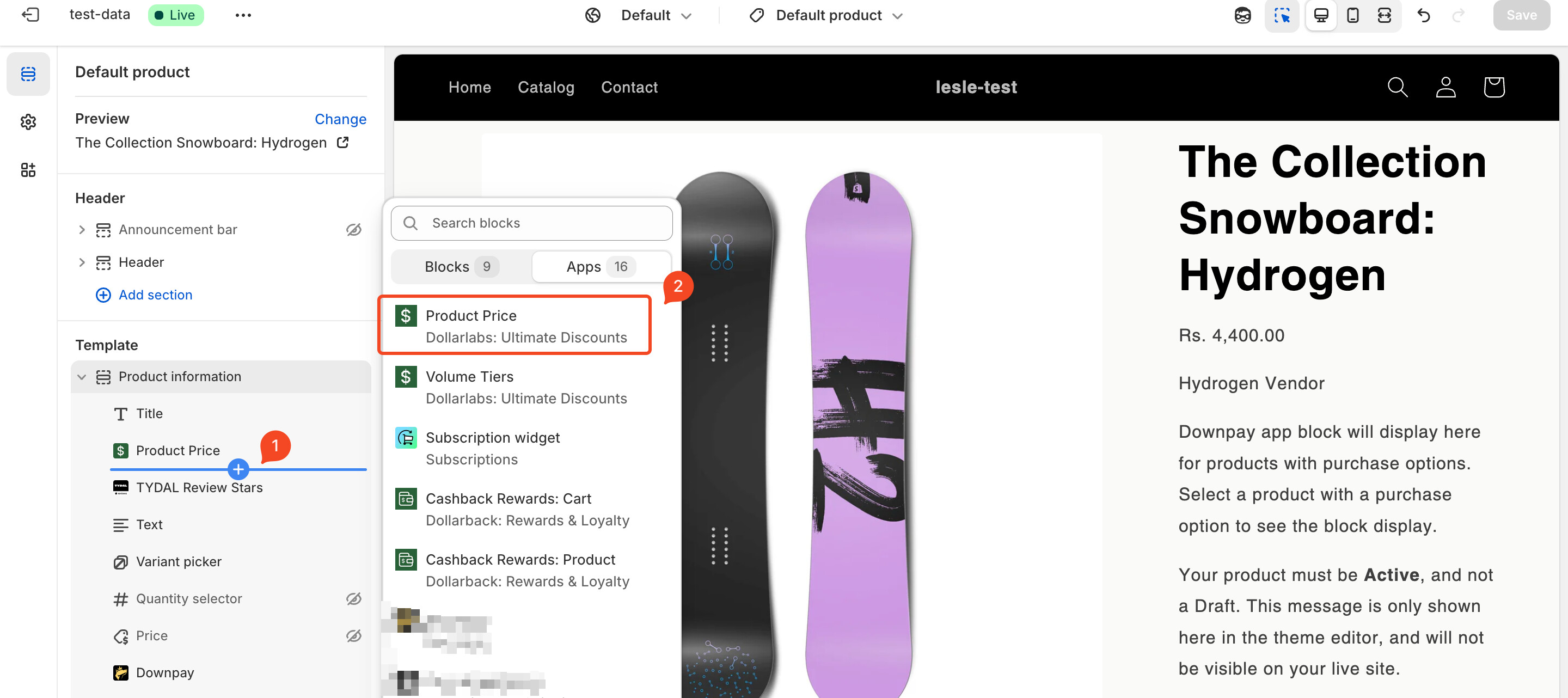
The next step is to place the price block on your PDP from the theme customiser, and you’re good to go 
Here’s how that would look like on your PDP. I’ve set it up so that VIP customers get 10% off on Liquid snowboard.
Here’s the product’s actual price on the backend, just for reference.
There are other ways to do this through custom code as well - but then you’d have to also consider the maintenance and the tech debt that comes along with such flaky solutions as well.
Let me know if you need anything else - happy to assist