I have a women’s clothing boutique website with the Sense theme, and I love it! But when one size of an item is sold out, it’s not very clear to the customer. For example, someone clicked on size large of one of my items, and the “sold out” popped up, but it’s so small she didn’t see it. Other themes, like Brooklyn, have a slash through the size when it’s sold out. Is that possible with the Sense theme?
2 Likes
@Silkandbriar - can you please share the product page link where you have this sold out product or variant?
Sorry you are facing this issue, it would be my pleasure to help you.
Welcome to the Shopify community! 
Thanks for your good question.
Please share your site URL,
I will check out the issue and provide you a solution here.
Thank you. It’s www.silkandbriar.com
@Silkandbriar - can you please share a product link which is sold out?
On this product, small and large are sold out, but it’s not obvious.
@Silkandbriar - add this css to the very end of base.css file and check
.product-form__buttons .button:disabled{text-decoration: line-through;
    font-weight: bold;}

Above is what I applied to the base.css file, and I don’t see any difference! I appreciate your attention to this matter!
1 Like
Was this resolved? having the same issue.
1 Like
oh sorry for that issue can you please send store url
https://www.rifale.mx/products/boletos-1-100?variant=39812483055900
click on item 10 or 11 (those are sold out)
@garzajp93 - your label do not have separate class or unique id, so I recommend to change sold out by adding this css, it will look like screenshot below
.product .price--sold-out .price__badge-sold-out {
    font-size: 15px;    font-weight: bold;    color: red;
}
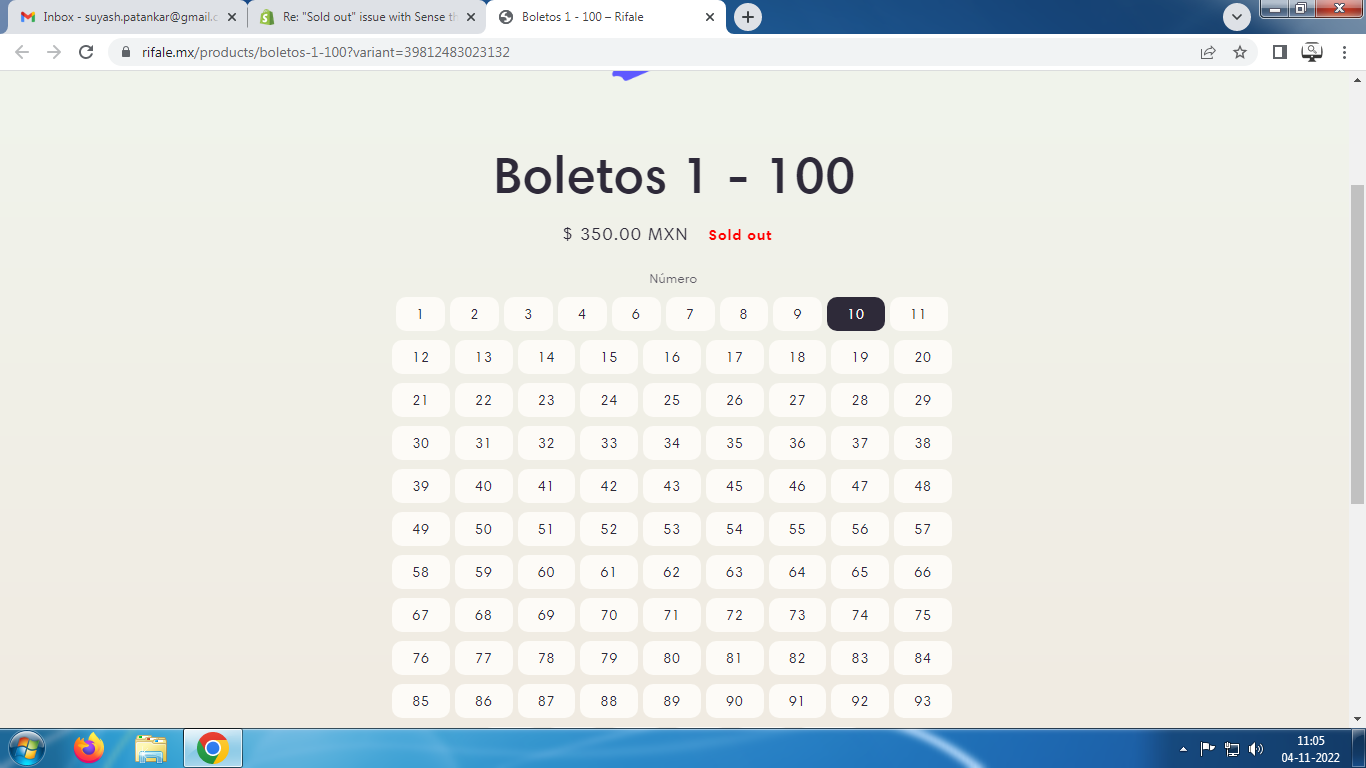
1 Like
It was not resolved!