emily34
February 24, 2022, 6:32pm
1
Hello,
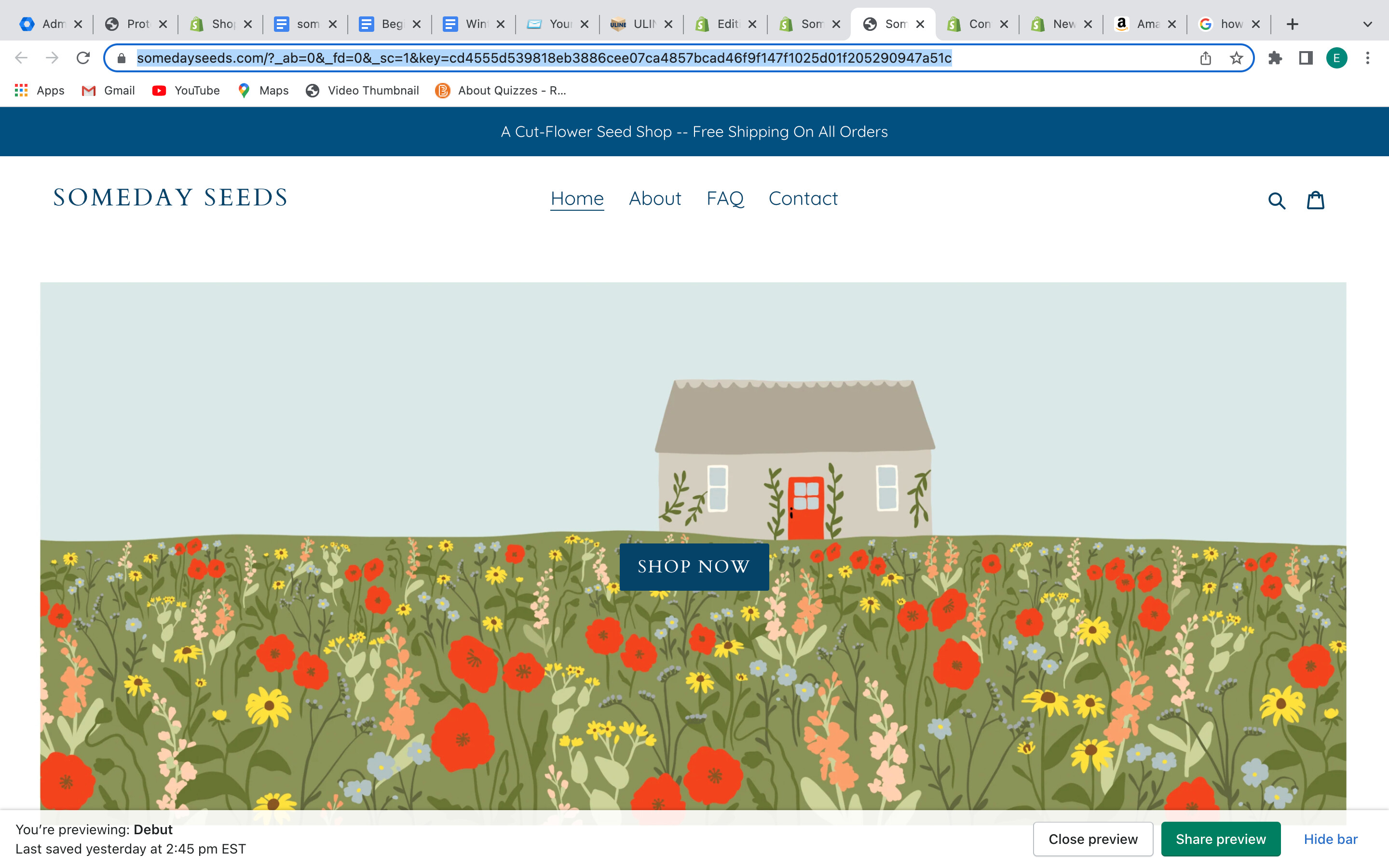
The button label (“Shop Now”) in my Text with Overlay section currently sits in the middle of the image. I would like to move it over to the left and up a little bit so that it is placed to the left of the cottage in the blue sky area. I use the Debut theme.
Thanks in advance.
URL:
https://somedayseeds.com/?_ab=0&_fd=0&_sc=1&key=cd4555d539818eb3886cee07ca4857bcad46f9f147f1025d01f205290947a51c
Guleria
February 25, 2022, 9:25am
2
Hello @emily34 ,
Edit theme.css under Assets and add this code at bottom.
@media screen and (min-width: 768px) {
.hero .hero__inner .page-width.text-center {
    position: absolute;
    top: 20%;
    left: 10%;
}
}
Thanks
1 Like
Hi @emily34 ,
You can follow the instruction below:
Go to Online Store->Theme->Edit code
Asset->/theme.css->paste below code at the bottom of the file:
@media (min-width: 990px) {
.hero .hero__inner .hero__btn {
    position: absolute;
    top: 10%;
    left: 10%;
}
}
If you feel like my answer is helpful, please mark it as a SOLUTION. Let me know if you have any further questions.