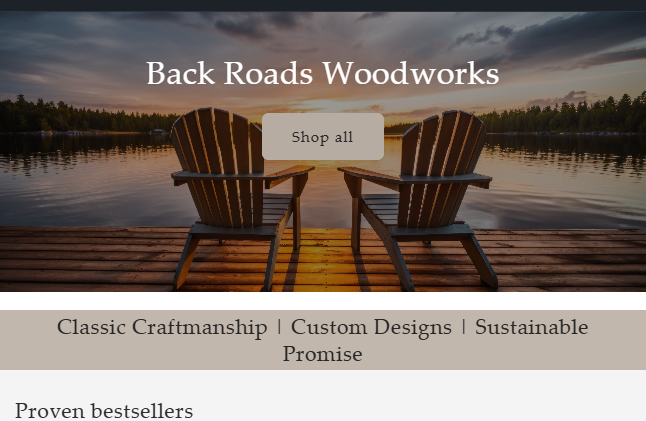
How to move Heading within Image Banner to top in Trade Theme

Topic summary

A user seeks to reposition heading text within an image banner on their Shopify Trade theme, specifically wanting “Back Roads Woodworks” to appear above a chair in the top-left area rather than its current centered position.

Solution Provided:
A community helper provided CSS code to be added to the theme’s stylesheet (base.css, style.css, or theme.css):

  • Desktop fix: Adjusts banner content alignment to flex-start and removes top padding
  • Mobile fix: Additional CSS targeting screens under 749px width to maintain consistent positioning across devices

Outcome:
The desktop solution was confirmed working by the original poster. A follow-up mobile-specific code snippet was then provided to achieve the same positioning on smaller screens. The issue appears resolved with both desktop and mobile implementations delivered.

Summarized with AI on November 4. AI used: claude-sonnet-4-5-20250929.

Hello. I need some help. I’d like to move the Heading text within the Image Banner to the top left. I’d like ‘Back Roads Woodworks’ to be above the chair on the left. I have searched the help boards for ideas and I have tried several solutions but nothing has worked in terms of editing the theme.liquid code. I must be missing something.

Thanks in advance.

1 Like

Hey @sonsofsack

Welcome to Shopify Community! Can you share your Store URL so I can have a look on it? Also, if you have password enabled then please share the password as well. Your cooperation would be greatly appreciated.

Best Regards,
Moeed

Hi @sonsofsack

Please, share your store URL. Thanks!

https://r6sem1-v7.myshopify.com/

Thanks for the info, try this one.

  1. From your Shopify admin dashboard, click on “Online Store” and then “Themes”.
  2. Find the theme that you want to edit and click on “Actions” and then “Edit code”.
  3. In the “Assets” folder, click on “base.css, style.css or theme.css” file, depending on which file your theme uses to store its CSS styles. At the bottom of the file, add the following CSS code:
@media screen and (min-width: 750px) {
    .banner__content.banner__content--middle-left {
        align-items: flex-start !important;
        padding-top: 3rem;
    }
    .banner--desktop-transparent .banner__box {
        padding-top: 0 !important;
    }
}

Your Feedback Matters! Please mark the solution and give likes to posts that helped you. Your appreciation fuels our motivation to assist you better!

1 Like

This works great on the desktop. Great work. Thanks. If we could do the same on mobile, that would be great also.

Add this code then, same Instruction.

@media only screen and (max-width: 749px){
.banner .banner__content {
    align-items: flex-start !important;
}
}

And save.

Result:

Please don’t forget to Like and Mark Solution to the post that helped you. Thanks!