A Shopify store owner wants to reposition the “Shop Now” button on their hero image for mobile devices. Currently, the button overlaps content; they want it centered below the text at the bottom of the image to improve visibility and user experience.
Three solutions were proposed:
CSS media query approach: Add code to base.css adjusting the button’s top position using !important for screens under 768px width.
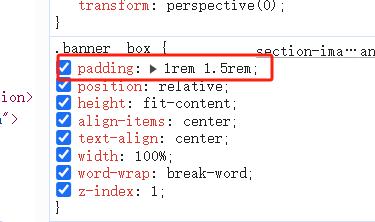
Flexbox alignment method: Modify section-image-banner.css by changing .banner__content from align-items: center to align-items: end, and reduce .banner__box padding from 4rem 1.5rem to 1rem 1.5rem.
Custom code injection: Insert markup code into password.liquid file above the </body> tag.
All three respondents provided screenshots demonstrating their proposed results. The discussion remains open with no confirmed resolution from the original poster regarding which solution worked best.
Summarized with AI on October 27.
AI used: claude-sonnet-4-5-20250929.
I am struggling to move the shop now button to the bottom of my hero photo on mobile. I want it to sit underneath the text in the centre so it doesn’t block any of the content and so users don’t need to scroll down to click on a product. I have circled in the screen shot below where I would like it to sit.