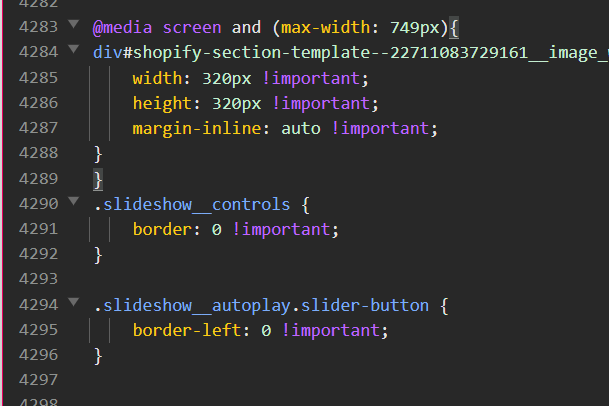
How to remove borders from the slideshow

Topic summary

A user needed help removing borders from a slideshow on their Shopify store. Their CSS code worked on mobile but not on desktop.

Solutions provided:

  • Add a media query targeting screens wider than 750px with border: none for .slideshow__controls
  • Fix a syntax error in the base.css file by adding a missing closing bracket } on line 4289

Resolution:
The issue was resolved after correcting the CSS syntax error. The missing bracket was preventing the desktop styles from applying properly.

Key technical detail:
The problem stemmed from malformed CSS in the base.css file, which broke subsequent style rules for larger screen sizes.

Summarized with AI on October 28. AI used: claude-sonnet-4-5-20250929.

Hi, I want to remove all borders from my slideshow, how can I do that? I mean the ones around the arrows, image frames, etc.

I already used this code, but it only worked on mobile, not sure why.

.slideshow__controls {
    border: 0 !important;
}

.slideshow__autoplay.slider-button {
    border-left: 0 !important;
}

Here’s my store: https://creationwithtim.com/products/cinematiq-lut-collection-copy
(Just scroll all the way down there’s the slideshow)

Thanks,

Tim

1 Like

Add this css

@media screen and (min-width: 750px) {

.slideshow__controls {

position: relative;

border: none;

}

}

1 Like

Hi @CreatorTim

Check your Base.css file where you paste the code.

Add 1 closing bracket } on the 4289 line.

And Save. Let me know if your still having problem. THanks!

Please don’t forget to Like and Mark Solution to the post that helped you. Thanks!

1 Like

Thanks bro! You’re legend