Topic summary
A user seeks to hide the product count displayed on collection pages in Shopify’s Dawn theme version 7.0.1.
Proposed Solutions:
Multiple support representatives suggest adding custom CSS code to the theme.liquid file:
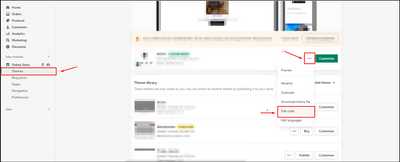
- Navigate to: Online Store → Themes → Actions → Edit Code
- Locate the theme.liquid file
- Insert CSS snippet before the closing
</body>tag
Technical Details:
The solution involves CSS styling to hide the product count element. Screenshots were shared showing the exact code placement and expected results.
Status:
The thread provides working solutions but lacks confirmation from the original poster about whether the fix was successfully implemented.

That issue is very simple can you share me Your website domain name
You can try this code by following these steps:
Go to Online store => themes => actions => edit code and add this code on file theme.liquid before tag

Hope this answer helps.
Best regards,
Victor | PageFly
Hi @Romeojewelers ,
Glad to support you today.
To can remove the number of products in the collections page, you can check out my suggestion below to make it:
- Go to Edit code on Online Store:
- add my code above the tag on Theme.liquid:
Eg:

I hope you find the answer helpful.
Kind & Best regards,
GemPages Support Team.