How to solve Reduce JavaScript execution time

Topic summary

A Shopify store owner is struggling with slow JavaScript execution caused by default theme files and installed app scripts. An attempt to split the main JS file into smaller parts resulted in errors and conflicts.

Recommended solutions include:

  • Defer and async loading: Use defer or async attributes on non-critical scripts to prevent render-blocking
  • Conditional loading: Load scripts only on pages where they’re needed using Liquid if statements (e.g., product slider only on product pages)
  • Lazy loading: Delay heavy widgets (reviews, chat) until user interaction or viewport entry
  • Code cleanup: Remove unused code, inactive GTM tags, and old functionalities
  • Minification: Ensure all JS files are minified, including third-party scripts
  • Avoid long tasks: Optimize code that blocks the main thread during user interactions

Important context: Lighthouse tests emulate slow conditions, so real-world performance may vary. The consensus is to combine and minify scripts rather than split them, as splitting can break dependencies. One responder also suggested using automated optimization tools like Website Speedy app.

Summarized with AI on October 28. AI used: claude-sonnet-4-5-20250929.

Hello

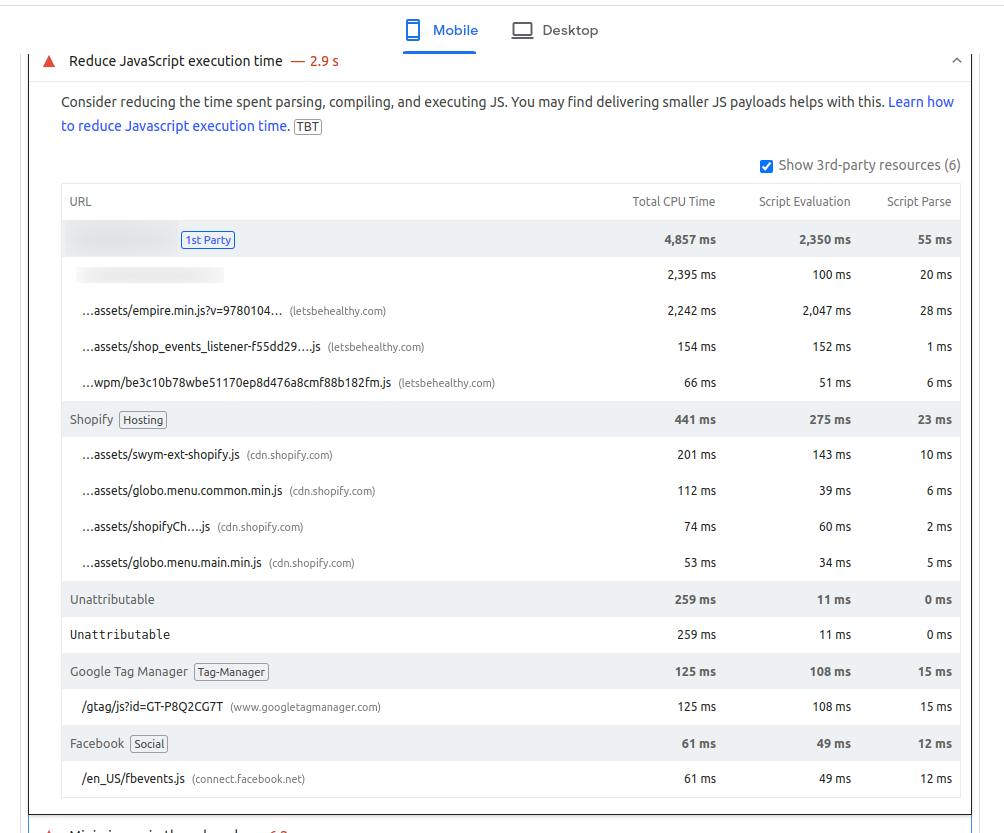
In most themes, there’s a default JavaScript file, and sometimes it takes a long time to execute. On top of that, when we install apps, their JS files also add to the execution time, which can slow down the store’s performance. So, how can we handle this kind of issue effectively?

I tried optimizing it by splitting the default JS file into two separate files, but that led to several errors and conflicts. Because of that, I wasn’t able to reduce the file size successfully. So, what’s the best approach to tackle this situation?

1 Like

One effective method is to defer non-essential app scripts and use async loading to prevent render-blocking. Also, combining and minifying your own theme scripts (instead of splitting) helps maintain structure without breaking dependencies. If you’d like, I can share a JS performance checklist we use when optimizing Shopify stores.

JavaScript execution time can affect your web performance because the browser must download, parse, compile, and execute the code using the same thread responsible for painting content on the screen and responding to user interactions.

The screenshot you’re sharing is from a Lighthouse test. Lighthouse is a great tool for identifying potential issues, but it’s important to remember that it emulates page load under relatively slow conditions. This means your real users might experience better performance (if their conditions are better than Lighthouse’s settings) or worse (if their conditions are even worse).

To help reduce its potential impact, here are some best practices you can follow:

  • Only load what’s necessary. If a JS file is only needed on specific pages, such as home page, limit its load to those pages. You can achieve this by modifying your theme.liquid code and adding anif statement to load the script only on targeted pages.

    For example, to load a script only on the homepage:

  • Remove unnecessary code. After some years managing a store or a project, it’s quite usual to keep old and unnecessary code. However, if you’re no longer using some functionalities that are part of your JS files, remove them.

  • GTM clean up. If you’re no longer using specific tags, remember to remove them from your GTM container. And if you’re activating and deactivating marketing campaigns during the year, please ensure you’re not triggering the associated tags when inactive because scripts are executed even though the campaigns are not active.

  • Use async or defer for third-party scripts, unless the script is necessary for critical content. This allows the browser to prioritize critical content and delay the execution of less critical scripts.
    By default, JS is parser-blocking, meaning the browser won’t read what’s below the HTML reference until the JS file is downloaded, read, and executed. If some scripts aren’t necessary during the page loading because they don’t contain critical code for initial rendering, you can add an async or defer attribute to the <script> tag depending on how important they are. You can find more information about this here.

  • Avoid long tasks. Long tasks can block the main thread during user interactions, potentially causing slow responsiveness. This might not directly impact the overall JavaScript execution time, but it can make a significant impact on user experience and Core Web Vitals. You have more information about how to optimize long tasks here.

  • Ensure JS files are minimized. This can help to reduce a bit the size of the files. Shopify serves minified theme JavaScript when it is requested by the storefront. However, it might happen that you’re using third-party scripts that are not minified.

I hope these general best practices will help you enhance JavaScript execution time and improve the experience for your real users.

Hello @tapan_sain , As per your question, reducing JavaScript execution time is one of the challenging tasks to do. Slow JavaScript execution can impact your store’s performance, affecting page load times and user experience.

Here are the ways to reduce JS execution time without breaking functionality:

1. Remove and Load App Scripts Smartly

  • Defer Non-Critical Scripts- Rather than splitting your js file , you can defer scripts that aren’t necessary for the initial rendering of the page. This way, they’ll load only after the main content is displayed:
  • Avoid loading JavaScript globally when it’s only needed on certain templates. Use Liquid conditionals:

{% if template == ‘product’ %}

{% endif %}

This ensures that scripts for specific features only load on the relevant pages, avoiding unnecessary load time on other pages.

  1. Lazy Load Heavy Widgets

For apps like product reviews, chat widgets, etc., load them after user interaction or when they enter the viewport:

window.addEventListener(“scroll”, function loadReviews() {

const script = document.createElement(“script”);

script.src=“https://review-widget-url.js”;

document.body.appendChild(script);

window.removeEventListener(“scroll”, loadReviews);

});

This ensures that these heavy scripts don’t block the initial page load and only load when necessary.

Alternatively, if you prefer not to handle this manually, I’d recommend trying Website Speedy – a Shopify speed optimization app that automatically reduces JavaScript execution time. It’s quick to set up and includes a 14-day free trial.