Hello,
I’m trying to change the color of the image banner text from black to white in the Dawn theme
I found this thread
https://community.shopify.com/c/shopify-design/dawn-theme-image-banner-text-color-change/m-p/1854099#M494407 But I can’t seem to get it to work.
I’ve tried to add these snippets to the base.css. I then save the css file and try to review it in a browser. No change.
.banner__heading{color:white !important}
.banner__box * {
color: white;
}
I also need to have the paragraph formatting changed to justified left on the
paragraph below the image banner.
https://smokersrevolution.ca/pages/carnivore-revolution-test
Hello @kirkcanada ,
lIt’s GemPages support team and glad to support you today.
Could you please share your store protection password then I can see and suggest something for you?
Best regards,
GemPages Support Team
Gem, You’re awesome You’ve helped me before!
pw;smokers
Hi @kirkcanada ,
I would like to give you a recommendation to support you so kindly follow steps below:
- Go to Online Store > Theme > Edit code of your current theme
-
Open your theme.liquid theme file
-
Paste the below code before
Let us know how it works for you.
Best regards,
GemPages Support Team
GemPages,
Once again you have been great!
That seems to have worked out great.
Can I bold the font for the heading in that section?
Any advice on the paragraph settings?
I find that I always prefer my paragraphs to be justified left instead of centered. Is there some way to change that setting site wide?
Hi @kirkcanada ,
You could please try adding the below code
Let us know how it works for you.
Best regards,
GemPages Support Team
GemPages,
That worked great!
But, I was looking for how to justify the paragraph text in the rich text section, where it says MEAT PRICES
I do like how it looks in the banner section!!
1 Like
Hi @kirkcanada ,
Do you mean you want this paragraph text to align left like other paragraphs above it?
It seems look not good, align center is the best choice in this case
Best regards,
GemPages Support Team
Yes I agree it doesn’t look great 
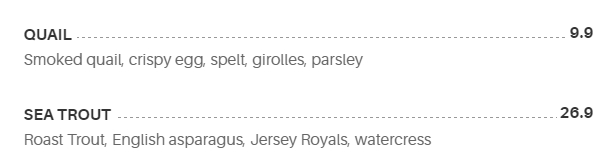
I was hoping to figure out how to do this. A responsive line with leader dots.