Hi,
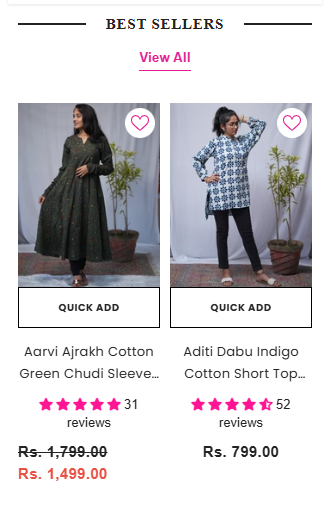
Can you please help to increase grid size only on mobile. Desktop looks fine. On main page the grid size looks pretty small.
Thanks!
Hi,
Can you please help to increase grid size only on mobile. Desktop looks fine. On main page the grid size looks pretty small.
Thanks!
Please add the following CSS code to your assets/ component-product-listing.css bottom at the file.
@media (min-width: 360px) {
    .productGrid .product {
        padding-left: 2px !important;
        padding-right: 2px !important;
        margin-bottom: 0;
    }
}
Thanks!
CSS for home page
Please add the following CSS code to your assets/ base.css bottom at the file.
@media (max-width: 551px) {
    .halo-product-block .products-carousel .product, .halo-product-block .products-grid .product {
        padding: 0 5px;
        max-width: 308px !important;
        width: 100% !important;
    }
}
Thanks!