Increase product images size and show image thumbnails in product page - Dawn Theme

Topic summary

  • Problem: In the Dawn theme, collection and homepage product images appeared too small. A custom CSS attempt (.collection .card__inner { width:120%; margin:auto; }) enlarged images but caused right-aligned misalignment, and product page images remained small with thumbnails not showing despite being enabled.

  • Initial fix: A helper instructed adding custom code in Online Store → Theme → Edit code → theme.liquid, placed before . This corrected image sizing and layout on the homepage and collection pages, which the requester confirmed.

  • Remaining issue: Product page still needed larger main images and visible thumbnails beneath the main image. The helper supplied a replacement code snippet for theme.liquid to address the product page specifically.

  • Outcome: The requester confirmed the product page images and thumbnails now display as desired. No further problems were reported; the issue is resolved.

  • Notes: Screenshots were central to illustrating sizing and alignment, and code snippets were the key solution, though the exact code content is not visible in the provided excerpt.

Summarized with AI on December 19. AI used: gpt-5.

Hello, I’m looking for help with dawn theme, my images are very small (Photo 1), then I found a code here to increase the images on collection pages and at the homepage but when I increase the images using this code the margin is wrong pulling to the right size (Photo 2).

Regarding the images on the product page it is also very small but the code above didn’t work there, also I didn’t find a way to show the other images that I uploaded below the main image, even that I have selected to show the thumbnails (Photo 3).

The code I used on collection pages and homepage:

.collection .card__inner {
width: 120%;
margin: auto;
}

Can someone help me?

(Photo 1) - I wanted the images to be bigger like the red mark around it

(Photo 2) - wrong margin when I use the code
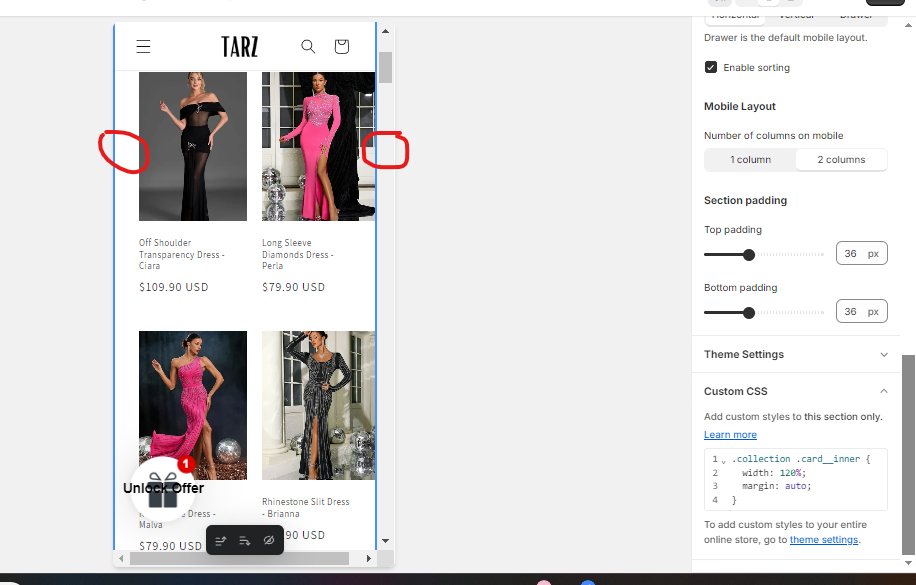
(Photo 3) - red mark show the size I wanted for the image and the thumbnails underneath the main image

1 Like
  • Here is the solution for you @LuizaSMC23
  • Please follow these steps:
  1. Go to Online Store → Theme → Edit code.
  2. Open your theme.liquid file
  3. In theme.liquid, paste the below code before and press ‘Save’ to save it

  • Please press ‘Like’ and mark it as ‘Solution’ if you find it helpful. Thank you.

Hello, thank you so much for your help! The images are perfect now in the homepage and collection pages.

For the product page image size and thumbnails, do you know what can I do?

1 Like

Please replace to this code @LuizaSMC23

  • Please press ‘Like’ and mark it as ‘Solution’ if you find it helpful. Thank you.

You rock!!! All perfect now, thanks a lot

1 Like