Hi! I just decided I want to rebrand my store before making it officially available. Is there any way to do that? I want a different name.
Hi, @NickOlsson .
Welcome to the Shopify Community and thank you for sharing your question here!
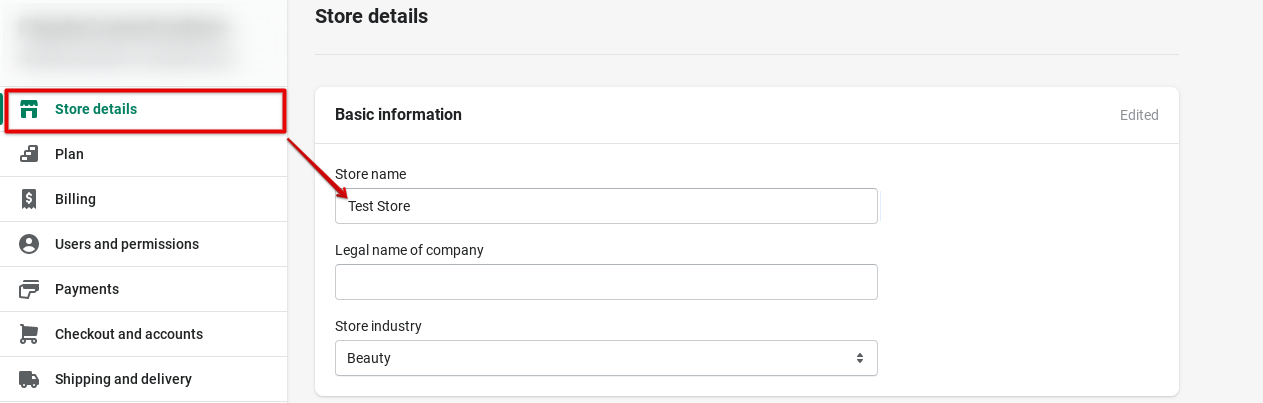
To change the name of your store, this can be done directly within your Shopify admin. I’ll share the steps and screenshots below.
How to change your store name:
- Head to your Shopify admin, Settings > Store details section.
- In the Store name field, enter the new name of your store.
- Hit Save.
If you’d like to change any other information such as business contact information or business address, check out our resource on adding business settings for your store.
What will you be rebranding your store as? To help you get started out on the platform I’d be happy to share additional resources with you for the launch of your store. I’ve shared them below for better visibility.
Getting started resources:
- Preparing your Shopify store for launch
- General checklist for starting a new Shopify store
- How to make your first sale in 30 days checklist
Let us know if you have any additional questions or need help setting up your store.
All the best!
1 Like
Thanks a lot, Victoria!