Could I make my product page my home page with the orgin theme?
Depends on the theme, but if you’re looking for a solution that works for any theme, then you may include this code in the theme.liquid file right before the tag:
{%- if template contains ‘index’ -%}
What you’d be doing with that is redirecting all traffic that gets to your index page, so that it gets sent to your product page.
Not very optimal, but that’s the first thing that comes to mind now.
1 Like
Hello there
Yes, you can make your product page your home page with the Origin theme.
-
From your Shopify admin panel, go to “Online Store” and then “Themes”. Find the Origin theme and click on “Customize” to launch the theme editor.
-
In the theme editor, navigate to the “Sections” tab and select the “Homepage” section.
-
In the “Homepage” section, click on the “Add section” button and select “Product” from the list of available sections.
-
In the “Product” section settings, select the product that you want to use as your home page.
-
Once you’ve selected your product, you can customize the product section to your liking. For example, you can choose to display the product’s price, description, and images.
-
Once you’ve finished customizing the product section, click “Save” to save your changes.
-
Finally, navigate to the “Navigation” tab in the theme editor, and set the “Home” link to the product page that you’ve just created. To do this, simply click on the “Home” link and select “Products” from the drop-down list. Then, select the product that you want to use as your home page.
Once you’ve completed these steps, your product page will now be your home page.
Hello @Jadon1
You can try to add code to redirect home page to a product page.
-
Go to Online Store → Theme → Edit code https://prnt.sc/fJOF9RnL7Rp5
-
Open your theme.liquid theme file
-
Paste the below code before
{% if template == 'index' %}

{% endif %}
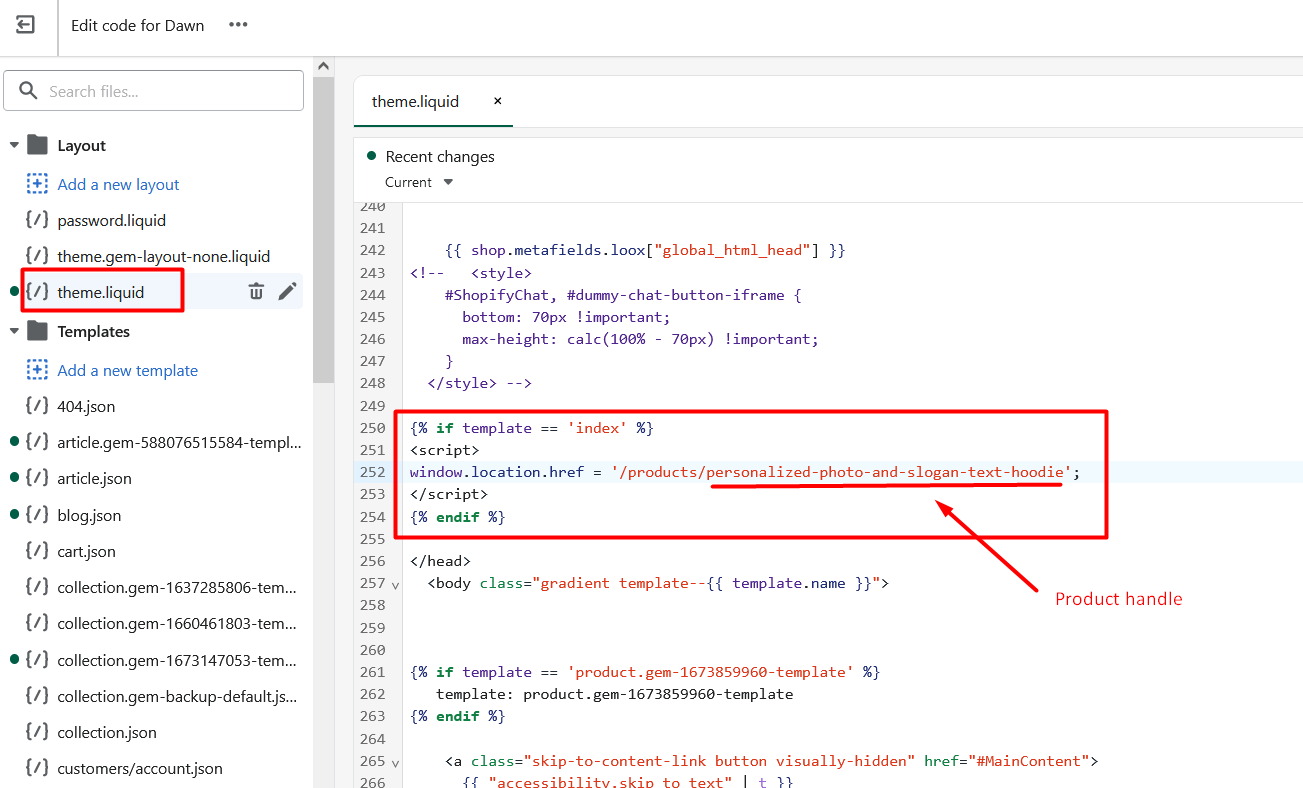
Best regards,
GemPages Support Team
4 Likes
Hi @Jadon1
This is Victor from PageFly - Shopify Page Builder App, I’d like to suggest this idea:
Go to Online Store->Theme->Edit code->theme.liquid->paste bellow code in tag
{% if template == 'index' %}

{% endif %}
Please refer to this screenshot:

Hope you find my answer helpful!
Best regards,
Victor | PageFly
1 Like
how can i do that on my store?
hi! when I tried this code and previewed my page it say 404 page not found and only works after hitting the button that says keep shopping how could I fix this?
Thanks for you info. I followed your instruction it and it works.
Just you forgot to add {% endif %} at the end of your code chunk.
{%- if template contains ‘index’ -%}
{% endif %}
