make featured collection product image smaller

Topic summary

A user is customizing their Dawn theme homepage to adjust the size of product images in a featured collection carousel. Currently, their hoodie images display too large in a single-column, swipeable layout, showing only one product at a time on mobile.

Desired outcome:

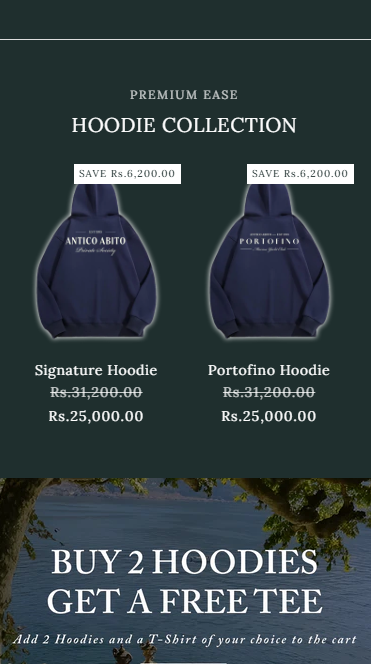
  • Smaller product images that allow a preview of the next item in the carousel
  • Similar visual effect to a reference screenshot provided

Solution provided:

  • Add custom CSS code to the theme.liquid file (above the </body> tag)
  • The code targets the featured collection section to reduce image dimensions
  • A result screenshot demonstrates the adjusted, smaller image size

Status: A working solution has been offered with implementation steps, awaiting confirmation from the original poster.

Summarized with AI on October 27. AI used: claude-sonnet-4-5-20250929.

hello, currently on my home page I have a featured collection of my hoodies. I only have 3 hoodies, so i made it so you swipe to see all the hoodies. I chose the 1 column and I clicked the option for enabling swipe on mobile, but i want to change the size of the image, as currently the hoodie looks really big. I want it to be slightly smaller, so you can begin to see the next hoodie. Here is my website:

this is my website, as you can see the hoodie is really big and you can only see one hoodie. I want it to look something like this:

my website is www.antico-abito.com , theme is dawn
2 Likes

Hey @ads18922

Follow these Steps:

  1. Go to Online Store

  2. Edit Code

  3. Find theme.liquid file

  4. Add the following code in the bottom of the file above tag


RESULT

If I managed to solve your problem then, don’t forget to Like it and Mark it as Solution!

Best Regards,
Moeed