Hi,
I’m having a problem with long descriptions on the Dawn Theme 12.0.0. My products currently look like this: https://bluehurricane-eu.com/products/bloomburrow-collector-booster-box.
When products have lengthy descriptions, the design looks unattractive. The width is fixed relative to other components, resulting in a long, narrow column for the description. I want to move the description below the product image and other elements, so that it appears in a more user-friendly layout.
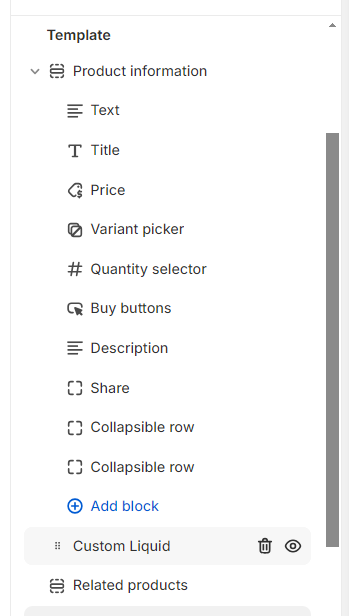
I have tried to find options to do this but haven’t had any luck. The description section appears to be unchangeable (see image below). Creating a new text section doesn’t automatically transfer the product description text to it. Does anyone know how to implement this? Any help would be appreciated.
1 Like
Hi @cgouveia
Check this one.
Go to your edit theme > products > add new section > custom liquid.
Drag the Custom liquid wherever you like to place. Click the code custom liquid. And Add the code below.
{{ product.description }}
example:
And Save.
Result:
Please don’t forget to Like and Mark Solution to the post that helped you. Thanks!
1 Like
Hi @cgouveia
You can do that by following these steps
- From your store admin > Sale channels > Online store
- In Themes, click Customize next to your Dawn theme
- Click on the dropdown menu where it says Home page > Products > Default product
- Under Product information, hover on Description, and click on the trash icon to remove the default description of the product.
- Click + Add section > Custom liquid, add this code below to Liquid
{{ product.description }}
1 Like
Thank you guys that fixed my problem! Thank for the prompt response also! Just one more thing, if I want to change the letter size or font on the liquid code of this new description, how could I do that?