Hi guys, anybody know how I can move the social media icons in the footer to be underneath my logo on the left rather than being centered? Any help would be greatly appreciated!
Website: fhuzeo.com
Hi guys, anybody know how I can move the social media icons in the footer to be underneath my logo on the left rather than being centered? Any help would be greatly appreciated!
Website: fhuzeo.com
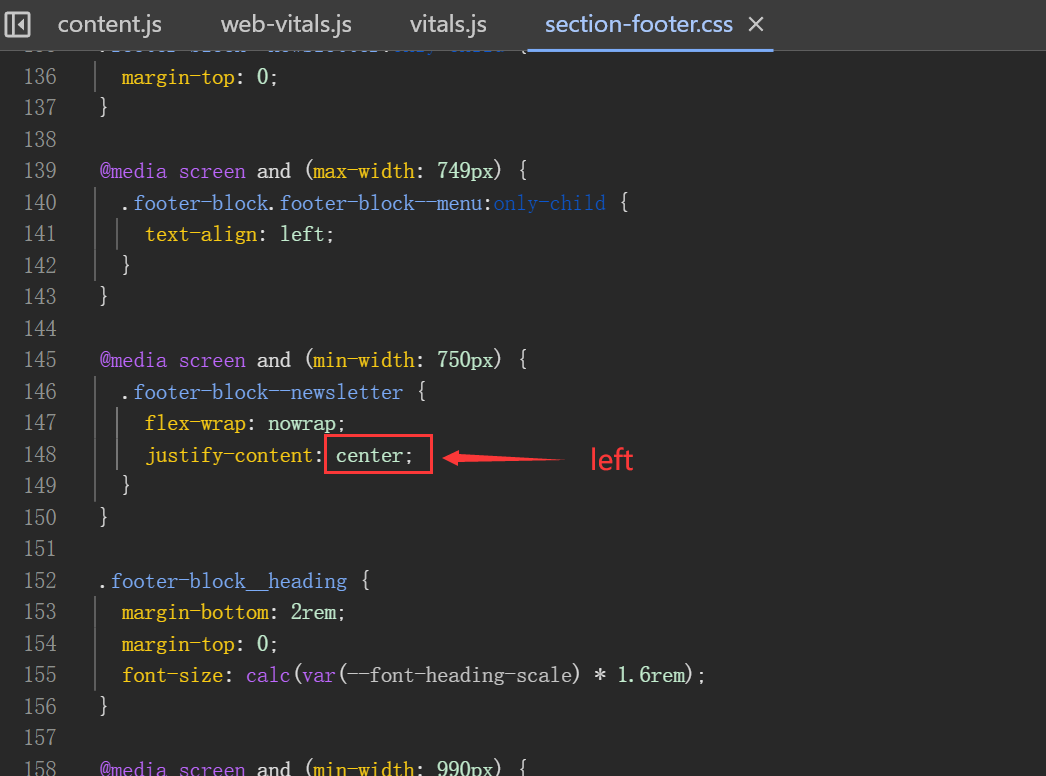
You can try this code by following these steps:
Step 1: Go to the online store ->Theme ->Edit Code.
Step 2: Find the section-footer.css file and change the ‘center’ to ‘left’
Hopefully it will help you. If yes then Please don’t forget hit Like and Mark it as solution!
Hello @flammagreg
You can add code by following these steps
Go to Online Store → Theme → Edit code.
Open your theme.liquid file
Paste the below code before on theme.liquid
Was my reply helpful? Click Like to let me know!
Was your question answered? Mark it as an Accepted Solution.
This is Noah from PageFly - Shopify Page Builder App
Please add code here to fix it:
Step 1: Online Stores > Themes > Edit code
Step 2: Choose file theme.liquid
Step 3: Add code above the tag
Hope my solution will help you resolve the issue.
Best regards,
Noah | PageFly
Hi @flammagreg ,
May I suggest to update code these steps:
Sections/footer.liquid
Find code below
{%- if section.settings.show_social and has_social_icons -%}
                        {%- render 'social-icons', class: 'footer__list-social' -%}
                       {%- endif -%}
Hello,
I am San from MS Web designer.
Go to Themes > Edit code > Theme.liquid > at the bottom place this code before
Do let me know in case of any concerns.
Regards,
San