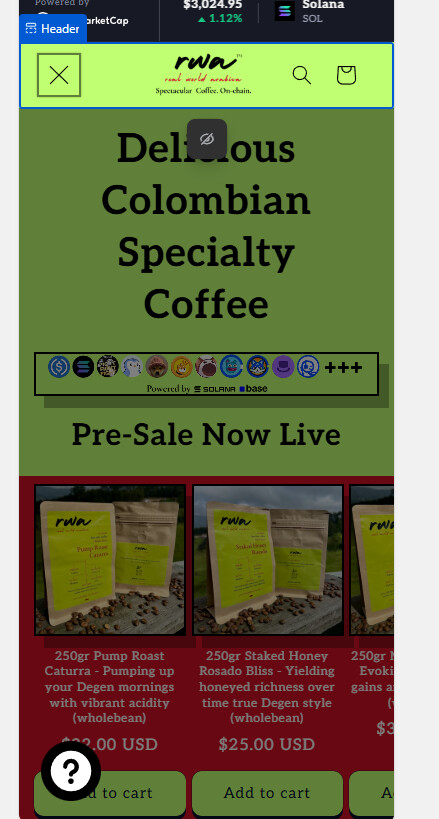
In mobile, the drawer menu seems to be blank. I have attached a screen shot. Shopify help sent me to this link but the code does not seem to fix anything. Would appreciate some help on this matter.
Topic summary
Mobile menu on a Shopify store (Trade theme) shows only a dark overlay with no content when opened on mobile. A screenshot was shared to illustrate the blank drawer.
Key details provided: theme = Trade; site made publicly viewable; earlier guidance led the user to paste JavaScript and CSS into base.css, which didn’t help and was removed.
Proposed diagnoses/fixes:
- One helper noted the pasted JavaScript belongs in a JS file, not CSS, and that the menu should work without extra code.
- Another suggested checking that the navigation actually has menu items in Admin > Content > Menu.
- A more fundamental fix was proposed: restore missing first lines in layout/theme.liquid (per Dawn reference). These set the html/js classes needed by theme scripts; CSS/JS band‑aids could break other features.
- A CSS workaround was offered to force the mobile drawer visible: a small @media rule targeting .menu-drawer visibility/transform.
Outcome: the user applied the CSS and confirmed the mobile menu displays, resolving the immediate issue.
Status: functionally fixed via CSS. A potential underlying cause (missing theme.liquid lines that set the html js class) remains unconfirmed; addressing it is recommended for a robust solution.
No one can help you without details..
What is the theme name?
What is the site url?
Upload theme editor screenshots including the panel.
Upload mobile menu settings screenshots.
What code did you insert?
Where did you insert code?
Did you remove said code?
1 Like
Hi! Sorry! I’m a newbie.
Theme name: Trade
Site url: http://www.realworldarabica.com
The link they guided me to: Shopify Mobile Menu Not Functioning Correctly (I pasted the code from this to base.css as mentioned in this but it did nothing)
here’s a screenshot of the mobile view when it’s clicked. It just shows a dark blank overlay.I inserted both mentioned codes into base.css:
document.querySelectorAll(‘[id^=“Details-collapsible_”] summary’).forEach((sum) => {
sum.setAttribute(‘aria-expanded’, false);
})
document.querySelectorAll(‘[id^=“Details-collapsible_”]’).forEach((details) => {
details.removeAttribute(‘open’);
})
and then:
body .menu-drawer {
width: 100%;
}
.overflow-hidden,
.overflow-hidden-mobile,
.overflow-hidden-tablet,
.overflow-hidden-desktop{
height: 100%;
overflow: hidden!important;
}
but nothing fixed so I removed both those codes.
Happy to provide any additional info! Thanks for the help!
First thing you need to provide is a preview (or storefront) password so we can see anything other than password page.
Not a big fun of this, but for starters,
This code is Javascript and should not be in .css asset.
Also, unless you’ve broken something, the menu should work without extra codes, and it’s always better to understand why existing code does not work rather than adding more code.
Hi tim thanks for the help. I have removed the password for the site.
Hi @RealWorldArabica
Please check if your menu contains menu items from your store admin > Contents > Menu?

Your theme code seem to be missing lines 1 and 2 in this file:
Restore them and it will fix your menu.
Do not try to fix it with CSS or JS code – there are other areas which depend on the js class set on html element.
Duplicate of:
- Header, Main Menu option in Mobile view is not working - #11 by tim_1
- Hello my navigation has completely disappeared from my mobile website - #2 by tim_1
- Hamburger Menu on mobile isn't working
if my post is helpful, please like it ♡ and mark as a solution -- this will help others find it
@RealWorldArabica please add this css to the very end of your base.css file and check
shopify admin->online store->themes->edit theme code->assets->base.css
@media screen and (max-width:749px){
.menu-drawer{visibility: visible !important; transform: translate(0%) !important;}
}
it should look like this

Thanks bro this fixed it!
1 Like
@RealWorldArabica welcome, do let me know if you need any more updates.