Need help about adding underline image

Topic summary

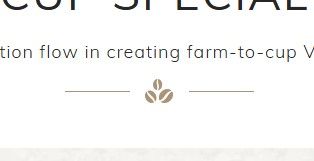
A store owner using the Dawn theme wants to add a decorative underline image beneath featured products or rich text sections. The desired effect includes horizontal lines on both sides of a central icon, as shown in an attached screenshot.

Current Status:

  • The discussion remains open with no solution implemented yet
  • Multiple developers have offered assistance

Proposed Solutions:

  • One developer suggests using CSS to create the effect
  • Implementation depends on whether the user has the icon image or needs one created
  • One offer includes free implementation in exchange for collaborator access to theme files

Next Steps:

  • User needs to provide either the icon image or store URL with password
  • Developers are waiting for access details to begin work
  • Solution will be shared publicly once completed for community benefit
Summarized with AI on October 27. AI used: claude-sonnet-4-5-20250929.

Im designing my store using dawn theme. I would like to add underline image under feature products or rich text, similar to the one in picture, is there way to do it?
Hi, @Ktrang

Can you take a screenshot to describe your requirements? So I can better support you.

Hey @Ktrang ,

We can achieve this using CSS, however, do you have the icon image that is displayed in the screenshot you’ve shared? Or we’ll need to create the same?

If you have the image/ icon then it’d become fairly simple to add lines on both sides and giving it the elite touch. We can do this for you for free, we’ll need to check your theme files first, just DM or email your collaborator code and we’ll get started. Later we can post the solution here for others to benefit :slightly_smiling_face:

Cheers!
Shubham | Untechnickle

1 Like

Hi @Ktrang , kindly provide your store URL please and if it is password protected, please share the password as well. Thanks