I’m trying to find a solution to where a customer puts in an order on Friday night. The order does not get fulfilled until about 10:30 AM PST. The customer that put the order in on Friday will not get their order shipped due to the product now being out of stock.
I want to be able to proactively reach out to those customers and let them know that the product became out of stock after they submitted the order and before fulfillment.
As it stands, they have to reach out to inquire about their order. Then we have to tell them it’s out of stock. This leads to a horrible customer experience. So I want to find a way to let them know that it’s out of stock. Automation would be best. Thanks.
Thank you for reaching out here. That is a great question!
Luckily enabling a few settings in your Shopify admin will ensure you don’t oversell items once they are out of stock.
To enable this, head to your Products section within admin. Then click on the product you’d like to edit and scroll down to the Inventory tab. You want to ensure that the ‘Continue selling when out of stock’ box is deselected. Then click Save.
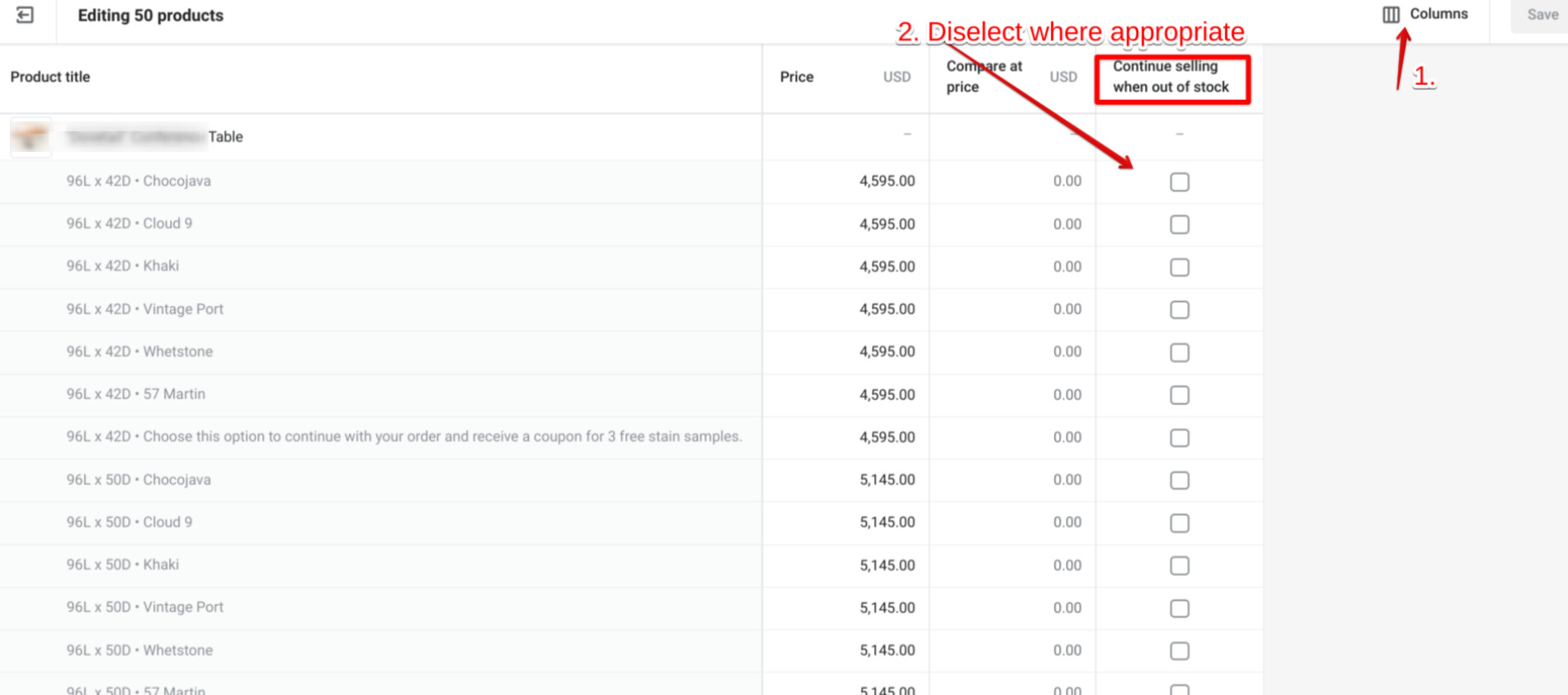
You can apply these changes using the bulk editor if multiple products need the same setting. Select all the required products and click Edit products. Then add the necessary column as shown in the screenshot below. Adjust the column accordingly and click Save.
This will ensure that once the inventory level is 0, the product cannot be purchased on the website. For this to be accurate, you have to ensure that the stock level in the warehouse matches the stock level you have on each product page.