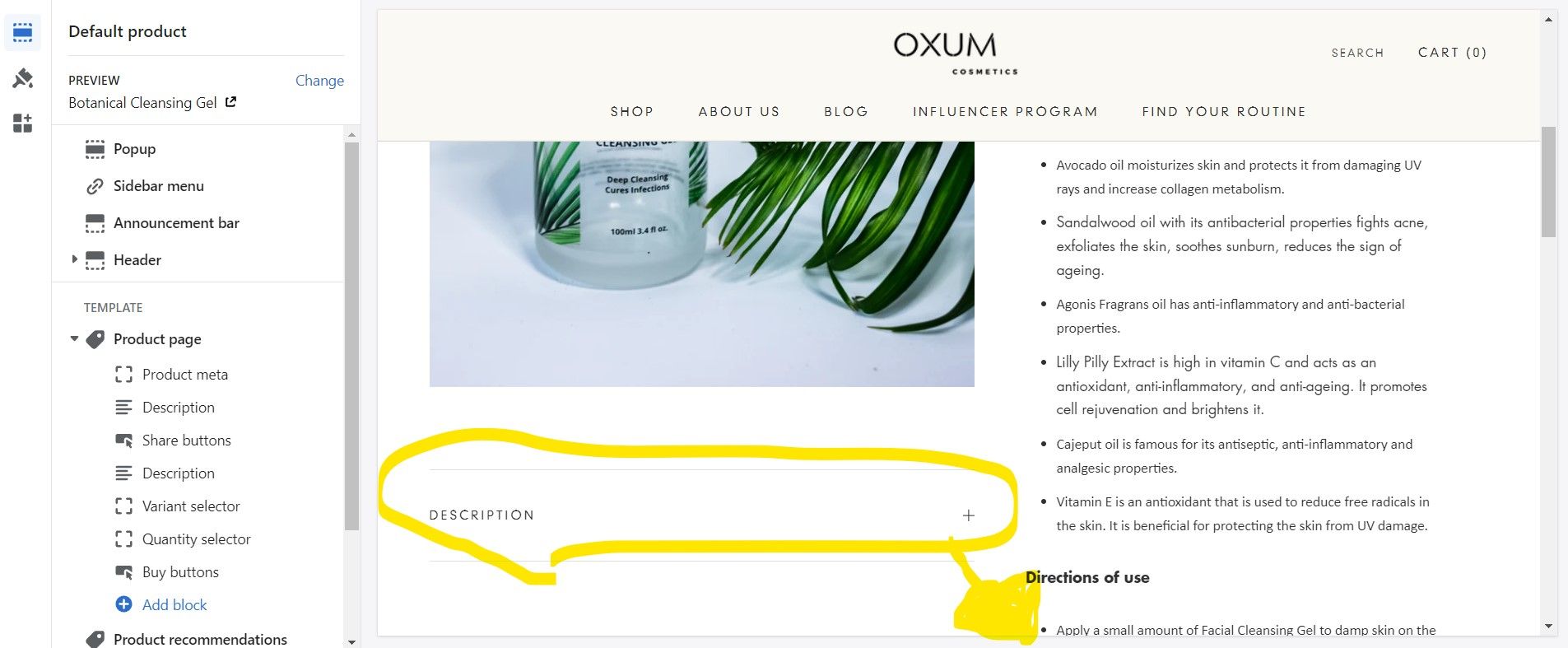
Hello @Celesnik ,
Prestige verion: 6.0.0
- Edit main-product.liquid under Sections and replace whole code with this one
{%- assign meta_block = section.blocks | where: 'type', 'product_meta' | first -%}
{%- assign share_buttons_block = section.blocks | where: 'type', 'share_buttons' | first -%}
{%- assign inventory_block = section.blocks | where: 'type', 'inventory' | first -%}
{%- assign buy_buttons_block = section.blocks | where: 'type', 'buy_buttons' | first -%}

{%- capture section_settings -%}
{
  "enableHistoryState": true,
  "templateSuffix": {{ product.template_suffix | json }},
  "showInventoryQuantity": {% if inventory_block != blank %}true{% else %}false{% endif %},
  "showSku": {{ meta_block.settings.show_sku | json }},
  "stackProductImages": {{ section.settings.stack_images | json }},
  "showThumbnails": {{ section.settings.show_thumbnails | json }},
  "enableVideoLooping": {{ section.settings.enable_video_looping | json }},
  "inventoryQuantityThreshold": {{ inventory_block.settings.inventory_quantity_threshold | default: 0 }},
  "showPriceInButton": {{ buy_buttons_block.settings.show_price_in_button | json }},
  "enableImageZoom": {{ section.settings.enable_image_zoom | json }},
  "showPaymentButton": {{ buy_buttons_block.settings.show_payment_button | json }},
  "useAjaxCart": {% if settings.cart_type == 'drawer' %}true{% else %}false{% endif %}
}
{%- endcapture -%}

{%- comment -%}
--------------------------------------------------------------------------------------------------------------------
PHOTO SWIPE

This is the root container for the zoom functionality. Must not be removed, as order element is important.
--------------------------------------------------------------------------------------------------------------------
{%- endcomment -%}

{%- if section.settings.enable_image_zoom -%}


{%- endif -%}

{% schema %}
{
  "name": "Product page",
  "class": "shopify-section--bordered",
  "blocks": [
    {
      "type": "product_meta",
      "name": "Product meta",
      "limit": 1,
      "settings": [
        {
          "type": "checkbox",
          "id": "show_vendor",
          "label": "Show vendor",
          "default": true
        },
        {
          "type": "checkbox",
          "id": "show_sku",
          "label": "Show SKU",
          "default": false
        },
        {
          "type": "checkbox",
          "id": "show_product_rating",
          "label": "Show product rating",
          "info": "To display a rating, add a product rating app. [Learn more](https://help.shopify.com/en/manual/products/product-reviews/installation)",
          "default": false
        },
        {
          "type": "checkbox",
          "id": "show_taxes_included",
          "label": "Show price taxes notice",
          "default": false
        }
      ]
    },
    {
      "type": "variant_selector",
      "name": "Variant selector",
      "limit": 1,
      "settings": [
        {
          "type": "select",
          "id": "selector_mode",
          "label": "Selector type",
          "options": [
            {
              "value": "block",
              "label": "Block"
            },
            {
              "value": "dropdown",
              "label": "Dropdown"
            }
          ],
          "default": "dropdown"
        },
        {
          "type": "checkbox",
          "id": "show_color_swatch",
          "label": "Show color swatch",
          "default": false,
          "info": "Some colors appear white? [Learn more](http://support.maestrooo.com/article/80-product-uploading-custom-color-for-color-swatch)."
        },
        {
          "type": "checkbox",
          "id": "show_color_carousel",
          "label": "Show color carousel",
          "info": "A pop-up selector with variant images for choosing colors. Only enables when color swatch is disabled.",
          "default": false
        },
        {
          "type": "page",
          "id": "size_chart",
          "label": "Size chart",
          "info": "Show along option named Size."
        }
      ]
    },
    {
      "type": "share_buttons",
      "name": "Share buttons",
      "limit": 1
    },
    {
      "type": "inventory",
      "name": "Inventory",
      "limit": 1,
      "settings": [
        {
          "type": "range",
          "id": "inventory_quantity_threshold",
          "label": "Inventory quantity threshold",
          "info": "Only show inventory quantity if below threshold. Choose 0 to always show.",
          "min": 0,
          "max": 50,
          "step": 1,
          "default": 0
        }
      ]
    },
    {
      "type": "buy_buttons",
      "name": "Buy buttons",
      "limit": 1,
      "settings": [
        {
          "type": "checkbox",
          "id": "show_price_in_button",
          "label": "Show price in add to cart button",
          "default": false
        },
        {
          "type": "checkbox",
          "id": "show_payment_button",
          "label": "Show dynamic checkout button",
          "info": "Each customer will see their preferred payment method from those available on your store, such as PayPal or Apple Pay. [Learn more](https://help.shopify.com/manual/using-themes/change-the-layout/dynamic-checkout)",
          "default": true
        }
      ]
    },
    {
      "type": "description",
      "name": "Description",
      "limit": 1
    },
    {
      "type": "liquid",
      "name": "Liquid",
      "settings": [
        {
          "type": "paragraph",
          "content": "This Liquid code will show on the right part of the product page."
        },
        {
          "type": "liquid",
          "id": "liquid",
          "label": "Liquid"
        }
      ]
    },
    {
      "type": "quantity_selector",
      "name": "Quantity selector",
      "limit": 1,
      "settings": [
        {
          "type": "checkbox",
          "id": "show_label",
          "label": "Show label",
          "default": false
        }
      ]
    },
    {
      "type": "text",
      "name": "Text",
      "settings": [
        {
          "type": "paragraph",
          "content": "This text will show on the right part of the product page."
        },
        {
          "type": "text",
          "id": "text",
          "label": "Text"
        }
      ]
    },
    {
      "type": "store_pickup",
      "name": "Local pickup availability",
      "limit": 1,
      "settings": [
        {
          "type": "paragraph",
          "content": "Show customers where they can pick up the product. [Learn more](https://help.shopify.com/en/manual/shipping/setting-up-and-managing-your-shipping/local-methods/local-pickup#show-pickup-availability-to-your-customers)"
        }
      ]
    },
    {
      "type": "@app"
    },
    {
      "name": "Content",
      "type": "content",
      "settings": [
        {
          "type": "paragraph",
          "content": "This content will show on the left part, below the product images."
        },
        {
          "type": "text",
          "id": "title",
          "label": "Title"
        },
        {
          "type": "liquid",
          "id": "content",
          "label": "Content"
        },
        {
          "type": "page",
          "id": "page",
          "label": "Content from page",
          "info": "If specified, takes precedence over inline content."
        }
      ]
    },
    {
      "name": "Reviews",
      "type": "reviews",
      "limit": 1,
      "settings": [
        {
          "type": "paragraph",
          "content": "To show reviews, install [Shopify Product Reviews](https://apps.shopify.com/product-reviews). This content will show on the left part, below the product images. "
        }
      ]
    },
    {
      "name": "Complementary products",
      "type": "complementary_products",
      "limit": 1,
      "settings": [
        {
          "type": "paragraph",
          "content": "To select complementary products, use the Search & Discovery app. [Learn more](https://help.shopify.com/en/manual/online-store/search-and-discovery/product-recommendations#complementary-products)"
        },
        {
          "type": "text",
          "id": "title",
          "label": "Heading",
          "default": "Buy it with"
        },
        {
          "type": "range",
          "id": "products_count",
          "min": 1,
          "max": 10,
          "label": "Products count",
          "default": 1
        }
      ]
    }
  ],
  "settings": [
    {
      "type": "header",
      "content": "Media"
    },
    {
      "type": "paragraph",
      "content": "Learn more about [media types](https://help.shopify.com/en/manual/products/product-media)"
    },
    {
      "type": "select",
      "id": "image_size",
      "label": "Size",
      "options": [
        {
          "value": "small",
          "label": "Small"
        },
        {
          "value": "medium",
          "label": "Medium"
        },
        {
          "value": "large",
          "label": "Large"
        },
        {
          "value": "fill",
          "label": "Fill screen"
        }
      ],
      "default": "large"
    },
    {
      "type": "checkbox",
      "id": "stack_images",
      "label": "Stack images on desktop",
      "default": true
    },
    {
      "type": "checkbox",
      "id": "show_thumbnails",
      "label": "Show thumbnails on desktop",
      "default": true
    },
    {
      "type": "checkbox",
      "id": "enable_image_zoom",
      "label": "Enable zoom",
      "default": true
    },
    {
      "type": "checkbox",
      "id": "enable_video_looping",
      "label": "Enable video looping",
      "default": false
    }
  ]
}
{% endschema %}
- Edit product-tabs.liquid under Snippets replace its whole code with this one
{%- capture product_tabs -%}
  {%- for block in section.blocks -%}
    {%- case block.type -%}
      {%- when 'content' -%}
{% comment %}
        {%- if block.settings.page != blank -%}
          {%- assign title = block.settings.page.title -%}
          {%- assign content = block.settings.page.content -%}
        {%- else -%}
          {%- assign title = block.settings.title -%}
          {%- assign content = block.settings.content -%}
        {%- endif -%}

        {%- if title != blank and content != blank -%}


                  {{- content -}}


        {%- endif -%}
{% endcomment %}
      {%- when 'reviews' -%}


{{ product.metafields.spr.reviews }}


    {%- endcase -%}
  {%- endfor -%}
{%- endcapture -%}

{%- if product_tabs != blank -%}

    {{- product_tabs -}}


{%- endif -%}
- last open theme.css under Assets and paste this css at the bottom
.Product__Aside.aside-left {
    padding: 0!important;
    min-height: auto !important;
}
.Product__Aside.aside-left .Collapsible--large .Collapsible__Button{
      padding: 18px 0;
}
.Product__Aside.aside-left .Collapsible{
  border-top: none !important;
}
Note: If you are using a different version Prestige theme please don’t replace the whole code and just take ideas from here.
Thanks