How to fix prices that overlap with the qty tabulation in the cart view menu, like this picture?
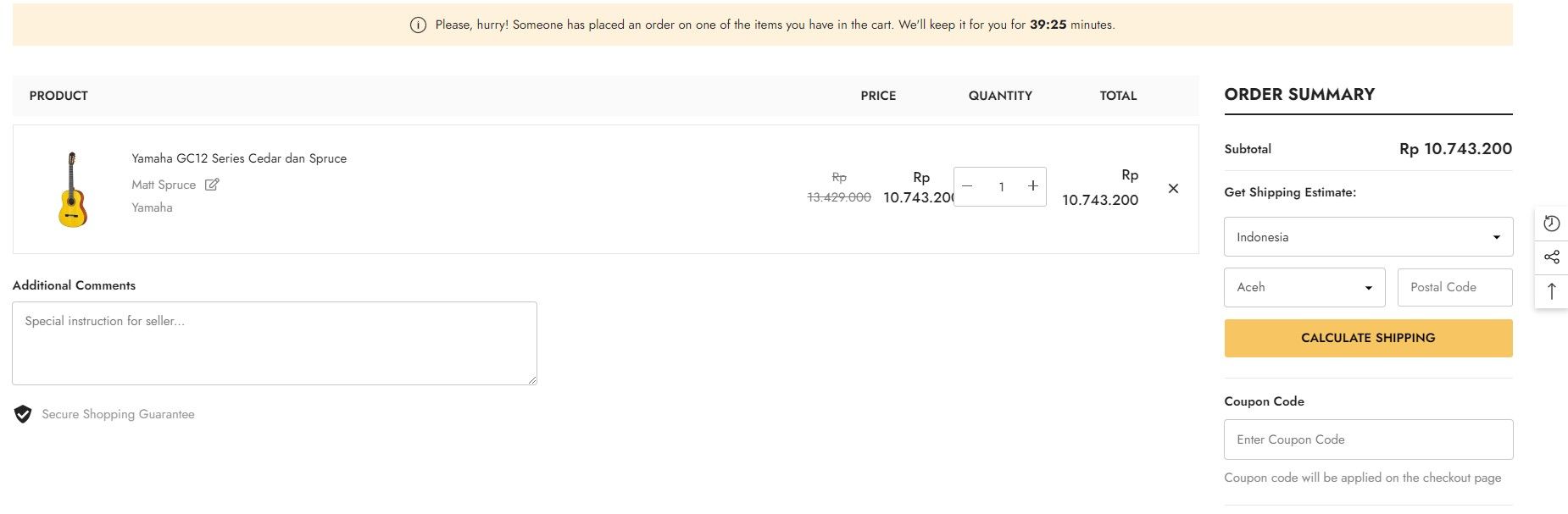
I used the theme from Ella by Halothemes.
give me a solution about my problem you can tell me how to fix that problem. thanks
How to fix prices that overlap with the qty tabulation in the cart view menu, like this picture?
I used the theme from Ella by Halothemes.
give me a solution about my problem you can tell me how to fix that problem. thanks
Hi @Henry5566
Welcome to Shopify Community.
Please share your store URL, page URL and also password (if your store has one) so we can help you.
Thank you,
Sajat Shrestha
Hey @Henry5566
Welcome to Shopify Community! Can you share your Store URL so I can have a look on it? Also, if you have password enabled then please share the password as well. Your cooperation would be greatly appreciated.
Best Regards,
Moeed
Hi @Henry5566
Could you share your store URL to check?
Hello @Henry5566 .
Our team is ready to help you.
Please share your website address and access password (if necessary) so that we can check and assist you.
this is my url, https://5058d4-eb.myshopify.com/cart thanks, we dont have password to access the url.
this is my url, https://5058d4-eb.myshopify.com/cart thanks
this is my url, https://5058d4-eb.myshopify.com/cart thanks, we dont have password to access the url.
Hi @Henry5566 .
Please go to Online Store → Edit Code and search for the file component-cart.css.
Then search for
.cart-item-block,
.cart-item-block.cart-item-price,
.cart-item-block.cart-item-quantity {
  width: 144px;
}
and replace it with
.cart-item-block,
.cart-item-block.cart-item-price,
.cart-item-block.cart-item-quantity {
  width: 155px;
}
This should do the trick.
Thank you,
Sajat
If this is helpful, please Like and Accept the solution.
Hi Sajat
Thanks to you, it works!