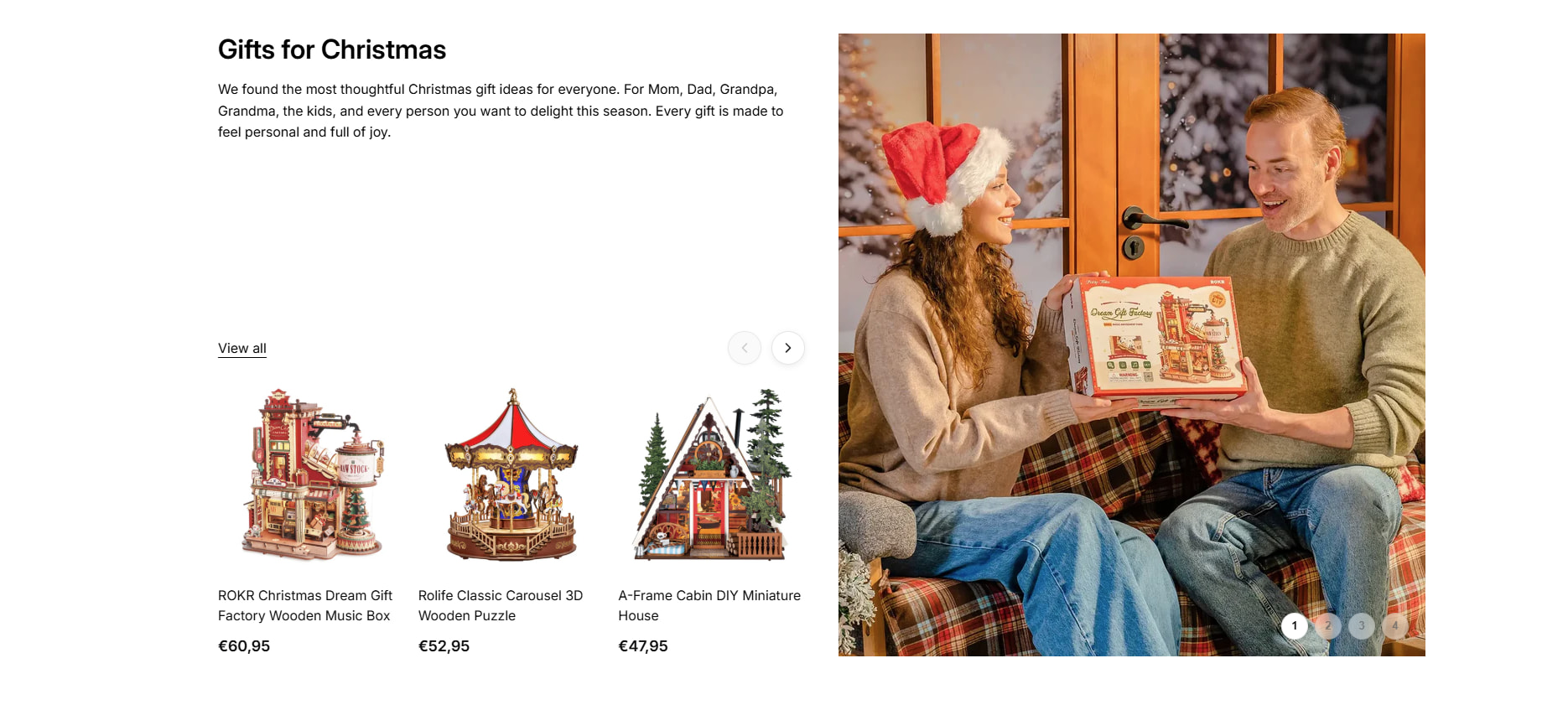
Hello Everyone,
I need assistance with a matter.
We had a custom section in the Horizon theme that was working perfectly, but after the last update, the quick add feature in this section is no longer visible. Can someone help us with this issue?
/* === Hard override: some themes hide Quick Add on mobile entirely === */
@media (max-width: 749px){
.ai-collection-showcase__quick-add-{{ ai_gen_id }} quick-add,

.ai-collection-showcase__quick-add-{{ ai_gen_id }} .quick-add{

  display: block !important;

  visibility: visible !important;

}

.ai-collection-showcase__quick-add-{{ ai_gen_id }} .quick-add__submit,

.ai-collection-showcase__quick-add-{{ ai_gen_id }} .quick-add__button{

  display: grid !important; /\* ensure the button actually renders \*/

}

.ai-collection-showcase__quick-add-{{ ai_gen_id }} .quick-add__submit.hidden,

.ai-collection-showcase__quick-add-{{ ai_gen_id }} .quick-add__button.hidden{

  display: grid !important; /\* defeat utility .hidden classes inside quick-add \*/

}
}
{% endstyle %}
<collection-showcase-{{ ai_gen_id }}
class=“ai-collection-showcase-{{ ai_gen_id }}”
{{ block.shopify_attributes }}
data-section-id=“{{ section.id }}”
data-collection-1=“{{ block.settings.collection_1.handle }}”
data-collection-2=“{{ block.settings.collection_2.handle }}”
data-collection-3=“{{ block.settings.collection_3.handle }}”
data-collection-4=“{{ block.settings.collection_4.handle }}”
>
<div class="ai-collection-showcase__left-{{ ai_gen_id }}">

  <div class="ai-collection-showcase__content-top-{{ ai_gen_id }}">

    <h2 class="ai-collection-showcase__heading-{{ ai_gen_id }}" data-collection-title>

      {% if block.settings.collection_1 != blank %}

        {{ block.settings.collection_1.title }}

      {% else %}Collection Title{% endif %}

    </h2>


    <div class="ai-collection-showcase__description-{{ ai_gen_id }}" data-collection-description>

      {% if block.settings.description_1 != blank %}

        {{ block.settings.description_1 }}

      {% else %}<p>Add a description for this collection</p>{% endif %}

    </div>

  </div>


  <div class="ai-collection-showcase__content-bottom-{{ ai_gen_id }}">

    <div class="ai-collection-showcase__carousel-wrapper-{{ ai_gen_id }}">

      <div class="ai-collection-showcase__carousel-header-{{ ai_gen_id }}">

        <a href="{% if block.settings.collection_1 != blank %}{{ block.settings.collection_1.url }}{% else %}#{% endif %}"

           class="ai-collection-showcase__link-{{ ai_gen_id }}" data-collection-link>

          {{ block.settings.link_text }}

        </a>


        <div class="ai-collection-showcase__nav-buttons-{{ ai_gen_id }}">

          <button class="ai-collection-showcase__nav-button-{{ ai_gen_id }}" aria-label="Previous products" data-carousel-prev>

            <svg xmlns=" http://www.w3.org/2000/svg " viewBox="0 0 24 24"><polyline points="15 18 9 12 15 6"/></svg>

          </button>

          <button class="ai-collection-showcase__nav-button-{{ ai_gen_id }}" aria-label="Next products" data-carousel-next>

            <svg xmlns=" http://www.w3.org/2000/svg " viewBox="0 0 24 24"><polyline points="9 18 15 12 9 6"/></svg>

          </button>

        </div>

      </div>


      <div class="ai-collection-showcase__carousel-{{ ai_gen_id }}" data-product-carousel>

        {% assign \_count = block.settings.products_count | default: 6 %}

        {% if block.settings.collection_1 != blank %}

          {% for product in block.settings.collection_1.products limit: \_count %}

            {% assign second_image = product.images\[1\] %}

            <div class="ai-collection-showcase__product-{{ ai_gen_id }}">

              <a href="{{ product.url }}" class="ai-collection-showcase__product-link-{{ ai_gen_id }}">

                <div class="ai-collection-showcase__product-image-wrapper-{{ ai_gen_id }}">

                  {% if product.featured_image %}

                    <img

                      src="{{ product.featured_image | image_url: width: 400 }}"

                      alt="{{ product.featured_image.alt | escape }}"

                      class="ai-collection-showcase__product-image-{{ ai_gen_id }} ai-collection-showcase__product-image-{{ ai_gen_id }}--primary"

                      loading="lazy" width="400" height="400">

                    {% if second_image %}

                      <img

                        src="{{ second_image | image_url: width: 400 }}"

                        alt="{{ second_image.alt | default: product.title | escape }}"

                        class="ai-collection-showcase__product-image-{{ ai_gen_id }} ai-collection-showcase__product-image-{{ ai_gen_id }}--secondary"

                        loading="lazy" width="400" height="400">

                    {% endif %}

                  {% else %}

                    <div class="ai-collection-showcase__product-image-placeholder-{{ ai_gen_id }}">{{ 'product-1' | placeholder_svg_tag }}</div>

                  {% endif %}


                  {% render 'product-card-badges', product: product %}


                  <!-- Quick Add inside image wrapper -->

                  <div class="ai-collection-showcase__quick-add-{{ ai_gen_id }}">

                    {% render 'quick-add', product: product, section_id: section.id, block: block %}

                  </div>

                </div>