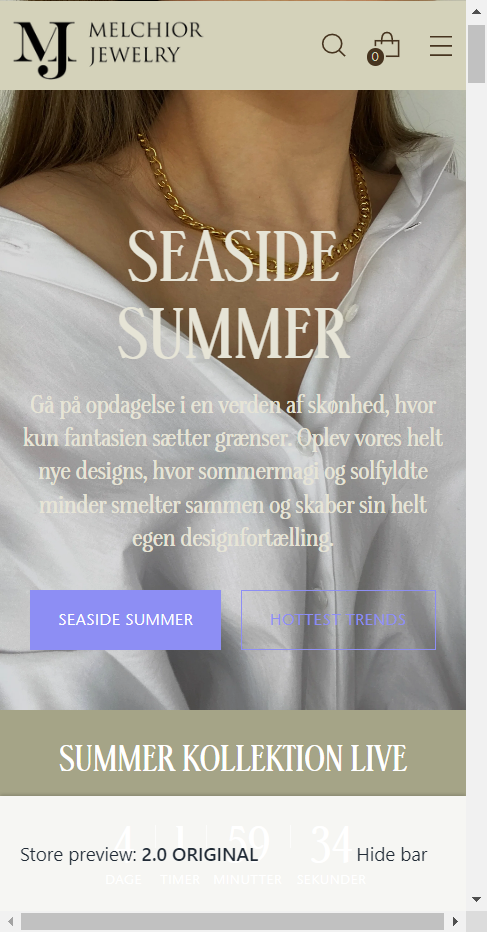
Hi everyone, I am making a new upgrade to my store, and just bought Stiletto Theme
Anyone who can help with some liquid coding, so this blank space followed by that footer gets removed. It is only on mobile view, computer seems great.
Thank you very much. I really hope someone can help!
https://xy5ordnw6xblqtrk-57068945600.shopifypreview.com/collections/alle-smykker
(Preview only available in two days)
.
.
.
.
.
.
.
.
@GemPages_Agents
@KetanKumar
@hammadCodes
@PaulNewton
@Ninthony
@dmwwebartisan
@ExpertRookie
@MandasaTech
@GemPages
@stinem123
Hello,
Please add below code above in theme.liquid
online store >> edit code >> theme.liquid
after that looks like that
if you want to discuss any further information then you can contact us
Thankyou:)
1 Like
Hi @shreyhweb , thanks for your reply! This works perfect, I really appreciate!
Also I was wondering, do you know if it is possible to change this text and bottom color (only on mobile view) because the image is lighter than the desktop image, so darker color is better - and then i need the buttons to be in two different colors, so the solid color no necessarily have to be the same as the outline color of the second button.
Hope this makes sense? Best regards, Stine
give us the URL of store then we will able to help
1 Like
Thank you so much @shreyhweb !
This is the store:
https://xy5ordnw6xblqtrk-57068945600.shopifypreview.com
The theme is not Live yet, because it is not ready for launch jet. The url of the “old webshop” that is live now is https://www.melchiorjewelry.com/
which type of colors are you want and also let us know that are you want only change the color of buttons?
1 Like
Hi, I am not sure yet. Have to see it on the webshop, but if you can maybe write the liquid coding, then I can always replace the HTML color code?
Can we do that? @shreyhweb
I want to change both color of text, and the colors for the buttons.
I want two different colors for the solid button and the outline button, and a third color for the text.
1 Like
@stinem123
Please try this below code in theme.liquid. i hope this is helpful for you.
here, you can change the color code which want to you.
after added the given code looks like that
Thankyou for reaching us 
1 Like
@shreyhweb Thank you so much, the buttons looks great!
Was it also possible to change the white text (header and subtext about buttons) to another color, only on mobile
And then if I want to make the previous liquid coding for the buttons also work for both mobile and desktop, how can I do that? Again, thank you so so much, I really appreciate!
if I want to make the previous liquid coding for the buttons also work for both mobile and desktop, how can I do that?
Answer - if you want to restore back the previous code then you just have to remove the applied code
1 Like
Hi @shreyhweb , no not like before - I did only have one color for both buttons before, so it had to be the same color. And now i can change different colors for each button. Can that work on computer too?
Do you have a code to edit color of the text only on mobile?
yes, will work on both mobile and desktop, for this you just have to put @media outside the code
1 Like
Hi @shreyhweb , there are already @media outside the first code you sent, but this only changes colors of the mobile screen - I want different colors of desktop and mobile - how to implement this in the code?
Hope you can help me out, thank you!
@stinem123
only change the media screen friend. ok i send the code for desktop. please check below code.
in this code you can change the button color on desktop version.
Thankyou
1 Like
@shreyhweb thank you very much, really appreciate. Works perfect!
Does anyone know how to change this white text, in header and subtext, only on mobile device?
https://www.melchiorjewelry.com/?_ab=0&_fd=0&_sc=1
Hi again @shreyhweb , I just found out that the code changed the color of all the other buttons at the webshop, and not just on the front Image hero..
How to make the code only appear on the Image hero on homepage? Otherwise I can´t really use the code. Hope you can help!
https://go466w5ufuepb8mb-57068945600.shopifypreview.com
@stinem123 try below code in theme.liquid file before closing tag
{% if template.name == "index" %}

{% endif %}
1 Like
Hi @Ujjaval , thanks for your reply! If you look take a look here, you can see it changes all buttons at home page, it should only change the buttons on the front picture. Do you think you can help with a solution? I really would appreciate so so much!
https://y6e3ym1hwx0y4clw-57068945600.shopifypreview.com
@stinem123 what colour and border you want to apply in mobile device can you tell me?
@Ujjaval The problem right now is both on computer and mobile device - the thing is that my theme only allows me to make one color for both buttons in “customize” (both the solid and the outlined button can only be the same color)
I want the opportunity to make the two buttons different colors, not the same.
And then the coding should only apper on the Image hero on the frontpage, and not affect the other buttons when scrolling down the site, as you ca see it does now.. https://y6e3ym1hwx0y4clw-57068945600.shopifypreview.com
I hope I makes sense to you. Thanks!!