Remove event from button 'Add to cart' in Product Page

Hi,

My cart icon for desktop version is like the next image:

If i go to a Product Page, and i click on button ‘Add to cart’, the value of the number of orders is updated by the total amount of the purchase:

If i refresh the page, looks good again:

So, the problem is on the event of ‘Add to cart’ from Product Page but i am not able to identify in the code the event that occurs when pressing the button.

Hope someone could help me.

Thnks!!!

EDIT: It would not be to delete the entire event, only the part that updates the cart icon label with the total purchase price and just show the total number of orders.

Please give your store URL. to check this and provide solution.

1 Like

https://tarzania-shopping.myshopify.com/

@varo1

Thanks

do you have remove on product page cart about price?

1 Like

Yes, I modified part of the code to show the total number of orders instead of the total price in the cart icon, but when the ‘Add to cart’ button is pressed, it still shows the total price.

@varo1

  1. Go to Online Store->Theme->Edit code
  2. Asset->/theme.scss.liquid->paste below code at the bottom of the file.
.site-header__cart-count span.money {
    display: none;
}
1 Like

Part of the problem is solved, now it does not show the total price of the cart but neither does the total number of orders appear when the ‘Add to cart’ event is launched.

Before event execution:

After:

Solved:

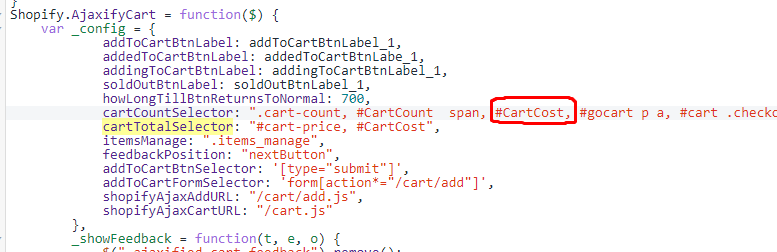
I’ve added to the file ‘new_theme.js’ the next tag:

And comment this line:

And Ajax updates the total cart items when ‘Add to cart’ is clicked in a Product Page.