I am using the sense theme template.How can I make the currency unit here not to be displayed?
Topic summary
A user working with Shopify’s Sense theme wants to remove the currency unit from product price displays.
Solutions Provided:
-
Code modification approach: Edit the
price.liquidfile in the Snippets folder, replacingmoney_priceandcompare_at_pricevariables with code that removes the currency symbol (e.g., replacing ‘USD’ with empty string). A conditional statement can limit this change to product pages only. -
CSS approach: Add display:none CSS rule targeting
.locale-selectors__containerin the theme.css file to hide currency elements.
Supporting Resources:
Multiple screenshots were shared demonstrating where to locate and modify the code. One responder offered to provide a custom solution if given the store URL.
Outcome:
The original poster confirmed the solutions were helpful and thanked contributors for their professional assistance. The issue appears resolved.

Hi @BellChester
Thank you for reaching out to the Shopify community.
To remove the currency unit from the price display in the Sense theme template in Shopify, you can follow these steps:
- From your Shopify admin, go to Online Store ->Themes->Edit Code.
- Now go to Snippets folder and search for file named price.liquid.
- Now locate the variable money_price and compare_at_price and replace those with the below code:-
{{ money_price | replace: 'USD',''}}

{{ compare_at_price | money_with_currency | replace: 'USD',''}}
- If you want to remove the currency unit only for product page, then add a condition to the above code:-
{% if request.page_type == 'product' %}
{{ money_price | replace: 'USD',''}}
{% else %}
{{ money_price}}
{% endif %}
{% if request.page_type == 'product' %}
{{compare_at_price | money_with_currency | replace: 'USD',''}}
{% else %}
{{compare_at_price | money_with_currency}}
{% endif %}
I have provided screenshots where you have to replace the code, below:-

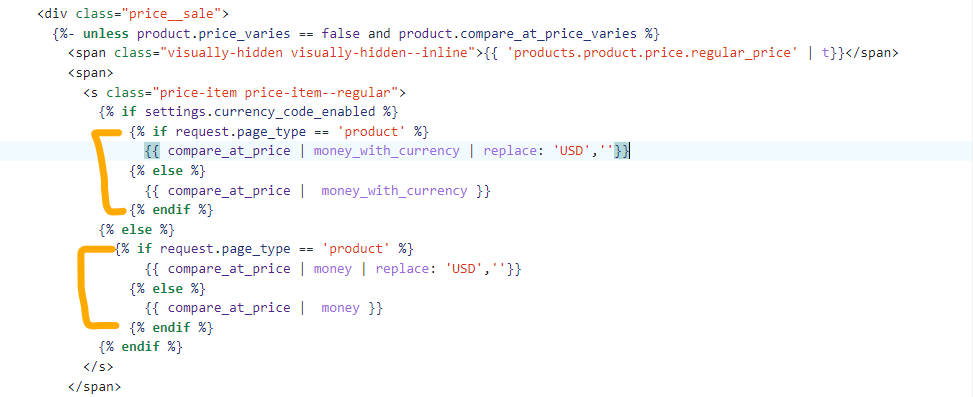

If you want to remove the currency unit everywhere on your store, just remove the if else condition.
Do give it a try and let me know if this was helpful.
Thanks.
1 Like
@BellChester
Can You Please Share Your Store URL I Will Check and Provide a Proper Solution
or Add this
Please Go to Online Store → Themes → Edit code → Assets → theme.css and paste this code at the end of this file.
.locale-selectors__container {
display: none !important;
}
1 Like
Hi @BellChester ,
This is Beae - The Best Shopify Page Builder, empowering you to create highly converting pages in just minutes. We hope to provide you with helpful answers.
Regarding your case, you can fix it in just some simple steps just as the image below;
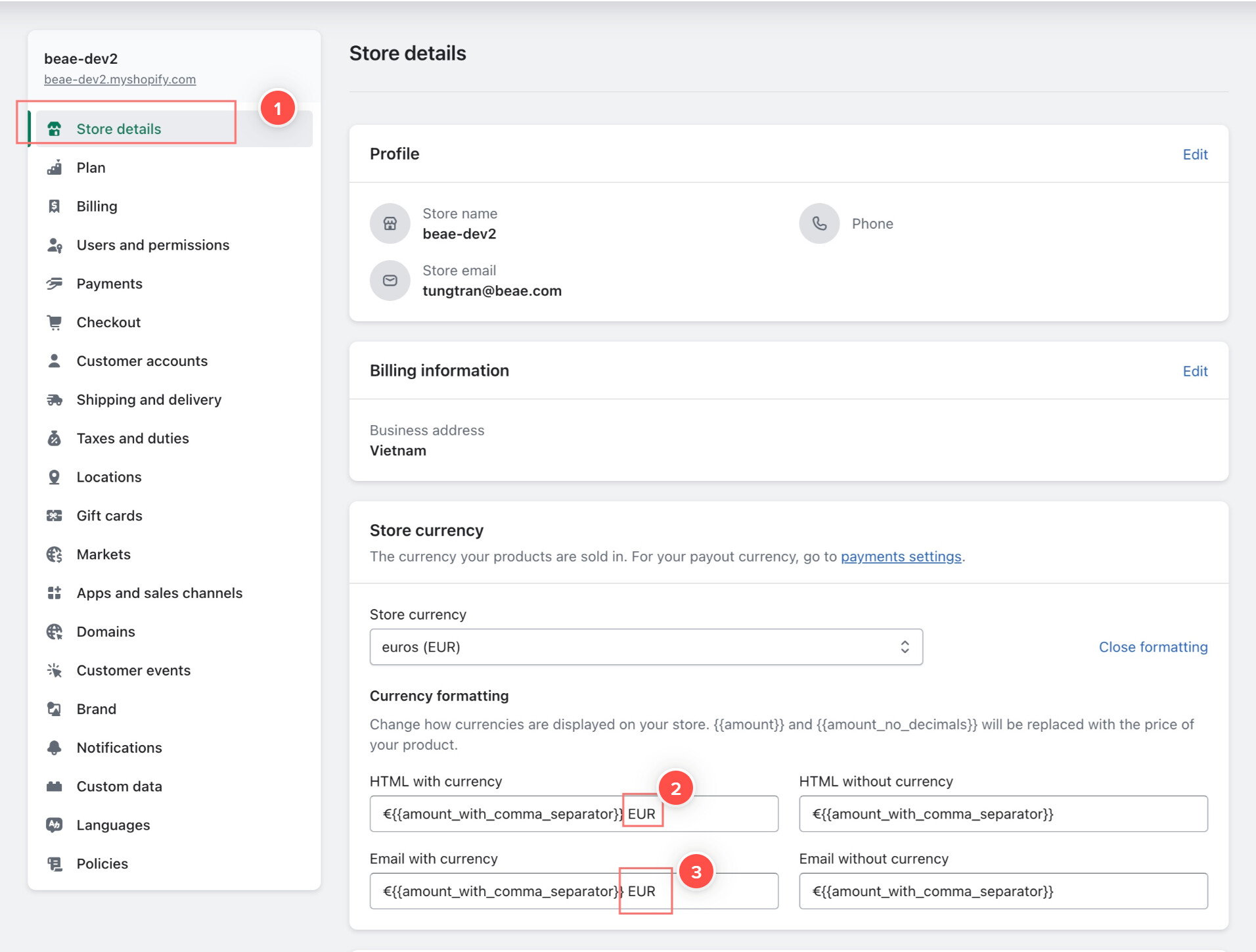
We hope this would help.
Best regards,
Beae Page Builder Team
1 Like
Thank you so much. Your reply is really professional and patient.
Thank you so much.