Request for shopify backend admin/products status icon

Topic summary

A user requests a visual enhancement to Shopify’s admin/products interface: changing the ‘Active’ status icon to a faded version when products have zero sales channels. This would make it easier to identify active products that aren’t published to any channel at a glance.

Additional requests include:

  • Displaying sales channel names instead of just numbers
  • Adding filter options for sales channels with three states: included, excluded, and exclusively
  • A way to list products published only to POS or a single sales channel

Current limitation: Another user confirms these features would be valuable, particularly noting it’s currently impossible to filter products that exist in zero sales channels.

Both participants hope the Shopify team will consider implementing these improvements. The discussion remains open with no official response yet.

Summarized with AI on November 14. AI used: claude-sonnet-4-5-20250929.

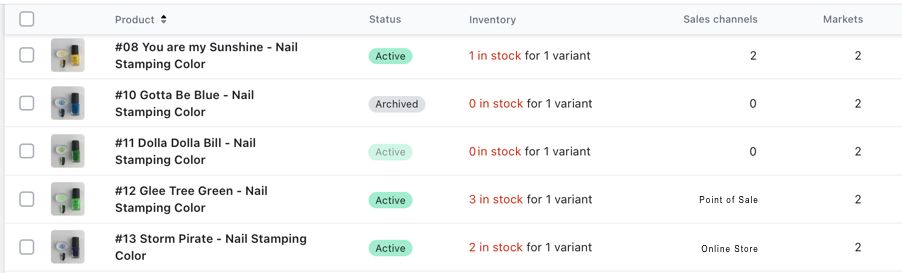
Hi, some of this might already be on your list, but I just wanted to request if you could change the ‘Active’ status icon on the admin/products when sales channels are 0 to a faded ‘Active’ status icon. This would help identify active products that are not published at a glance, like image below.

It would be helpful when there is only 1 sales channel the name would display rather than the number, image below.

I also don’t see a way to list all products only published on the POS (or a single sales channel), maybe the filter for sales channels could have included, excluded and exclusively.

Cheers
1 Like

Some of these feature would be very helpful. Especially in my case the included, excluded and exclusively for Sales Channel – at the moment it is impossible to filter products which are in 0 sales channel. Would really appreciate the Shopify team to look into it.