does anyone know how to move the search bar from dropdown menu to the header on motto theme phone version. it is in the header on laptop version but on phone it is very hard to find the search
Topic summary
A Shopify store owner using the Motto theme wants to move the search bar from the dropdown menu (“three dots” menu) to the header on mobile devices, as it’s already visible in the header on desktop.
Solution provided:
- Access Shopify admin → Online Store → Themes → Three dots → Edit code
- Open the
theme.liquidfile - Add custom CSS code before the
<body>tag
Initial attempt: The first CSS snippet made the search bar visible but didn’t remove it from the dropdown menu.
Final solution: A second CSS code snippet successfully:
- Displays the search bar in the mobile header
- Hides it from the dropdown menu
- Positions it on the left side of the cart icon
The issue was resolved with step-by-step visual guidance including screenshots showing exactly where to place the code in the theme files.
1 Like
hey @Kristjan777 share the URL of your website so i can help you
1 Like
well apparently the word is banned for some reason so i cant post it, but let me try this bio fit.is just remove the space between bio and fit
so then no issue
yes, its https://bio fit.is/ but you have to remove the space between the the words bio and fit, in cellphone version i want the search bar to be moved from the dropdown menu to the header, thank you

Go to online store ----> themes ----> go to three Dots ----> edit code ---->find theme.liquid files ----> place the code ---->
under the tag before the body ----->
if this code work please do not forget to like and mark it solution
I’m no coder so i dont quite understand, can you be a little bit more specific?
I cant send a screenshot of what im doing because it comes in png and i dont know how to change it
and I want the search bar out of the three dot and to the front page header, just to be a little clearer
ok i very simple follow these steps
open the shopify admin page
Go to online store ----> themes ----> go to three Dots ----> edit code ---->find theme.liquid files ----> place the code ---->
and place the code if you need more help then ?
i cant get it to work, I dont know where to place the code
first open this one
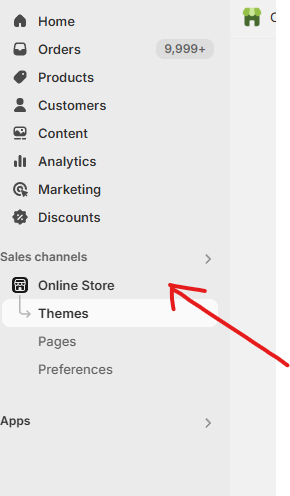
then open these three dots

then open edit code option

then open then theme.liquit file

and last but no a less place then code before the body

ok I found where to put it and it worked but the search bar is still in the “three dot drop down menu”
i want it to be on the front page header on the left side of the cart or “karfa”
1 Like
@media screen and (max-width: 767px) {
.header__search {
    display: flex;
 }
.menu-drawer__bottom-right {
    display: none !important;
 }
}

follow the same steps that i all ready given to you above
and if i manage to help you then don’t forg
it worked! you are the champ! thank you very much!!
hey Mustafa, the theme updated and the search bar was moved back to its original place, but now the script has changed and it doesnt match the description you gave me last time. can you help me out again? @Mustafa_Ali
1 Like
Hey @Kristjan777
Let me take this over from here.
Follow these Steps:
- Go to Online Store
- Edit Code
- Find theme.liquid file
- Add the following code in the bottom of the file above </ body> tag
<style>
@media screen and (max-width: 767px) {
.header__search_desktop {
    display: flex !important;
}
}
</style>
RESULT:
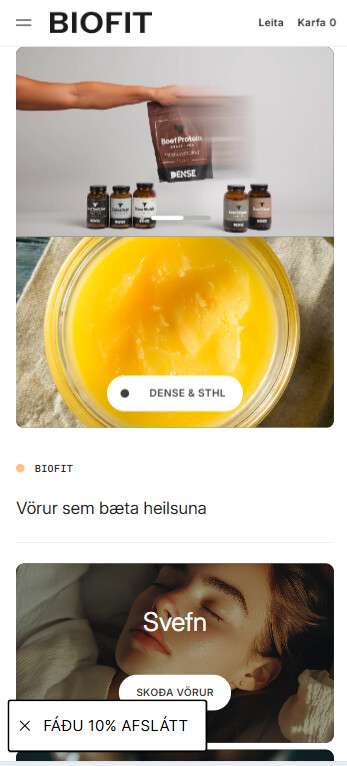
If you require any other help, feel free to reach out to me. If I managed to help you then a Like would be truly appreciated.
Best,
Moeed
1 Like
thank you very much!! have a good rest of your day
1 Like
Thank you for your reply. I’m glad to hear that the solution worked well for you. If you require any more help, please don’t hesitate to reach out. If you find this information useful, a Like would be greatly appreciated.
1 Like