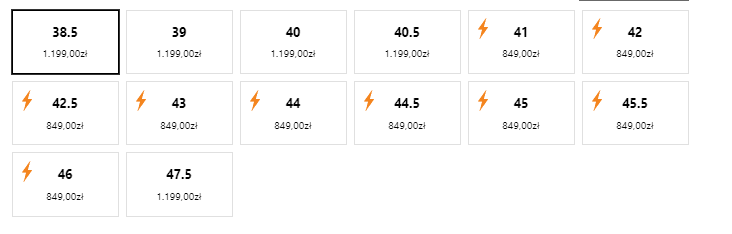
Does anyone know what application allows you to add such a variant picker as shown in the picture? The most important function is to customize the appearance and display prices for each variant.
Topic summary
A user is seeking an app to create a custom variant picker that displays different prices for each variant option, sharing a reference image.
Suggested Solutions:
-
Swatch King: Recommended for its preset “Swatches/Buttons with price” feature that can be used immediately or customized further. A referral link with discounts was provided.
-
Easify Product Options: Suggested as an alternative that allows adding variant pickers with different prices. While it may not look identical to the reference image, it’s described as simple to set up. Screenshots of both the app settings and the resulting display were shared.
-
Custom Theme Development: One respondent noted that the icon placement in the reference image likely indicates custom theme work rather than an app-based solution, offering paid customization services.
The discussion remains open with multiple app options presented but no final decision indicated.
Hey @Krzychuszong ,
Swatch King does it beautifully. Swatches/ Buttons with price is a preset available, you can start using it right away or customise it further accordingly.
Use this link to get some discounts: https://partners.starapps.studio/referral/vsk/untechnickle
Cheers!
Shubham | Untechnickle
The Icon placement probably means it’s an investment in actual theme customization and not an app.
If you need a customization like this then contact me for paid services.
Contact info in forum signature.
ALWAYS please provide context, examples: store url, theme name, post url(s) , or any further detail in ALL correspondence.
You can use the Easify Product Options app to add a variant picker with different prices like the one shown in your picture. It may not look exactly the same but this app is very simple to set up, here’s how it works:
- This is the result

- This is the app setting:

I hope this answer helps solve your problem. If you need further assistance, feel free to reach out to Easify anytime! 