Hi there,
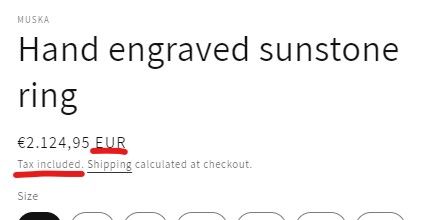
I noticed that taxes text “Tax included” disappears only when I select USD.
In other cases, EUR, GBP and JPY, it is displayed.
Now, I am checking in the default Shopify theme Dawn.
Please give me some advice.
Thank you,
Taku
Hi there,
I noticed that taxes text “Tax included” disappears only when I select USD.
In other cases, EUR, GBP and JPY, it is displayed.
Now, I am checking in the default Shopify theme Dawn.
Please give me some advice.
Thank you,
Taku
Hi, @Taku-1969
Enable including or excluding tax based on your customer’s country
Hi @Taku-1969 ,
@Ecommpremium touches on this here. If you select the box to charge taxes for customers based on the country they are ordering from it might not be applicable for them and thus not show up in the order. To be sure you have the correct tax settings for where you’re based from, Shopify has a guide for setting up your taxes in your store admin which you can read here.
Something else I will suggest is to speak to a professional accountant to make sure you are set up correctly with all your taxes and to make sure you’re paying the correct taxes yearly as a business also. I can’t stress this enough!
Thank you for your answer.
I understood the Tax calculations settings relate to my problem.
In my store, I checked "Include or exclude tax based on your customer’s country
", and Taxes are set to “Not collecting” for all regions excluding Japan.
When I choose JPY, prices include tax and “Tax included” text is shown understandably.
When I choose USD, conversely, prices don’t include tax and “Tax included” text is not indicated.
When I choose GBP or EUR, however, prices don’t include tax, on the other hand, the tax text is shown.
Why do they show a different results?
Hi @Taku-1969 ,
I understand what you mean and that does sound a bit strange. I’m really not sure why that would be and it’s difficult to know why it might be happening without taking a closer look into your tax settings. If you want to look through this with someone on our team in real time, don’t hesitate to contact an advisor on our support team here.
Can I asked where you’re based and are you 100% sure taxes aren’t supposed to be included in orders from Europe? I’ve linked the help guide here for setting up EU taxes here in case you wanted to look through it and make sure all is correct with your store regarding what the guide says.
Hi Nick,
Thank you for your advice!
In the meantime, I have fixed this problem by rewriting the code of the product page.
However, as you pointed out, I need to check carefully regarding the tax collection in my store.
I will make sure to check the page you gave me carefully.
Anyway, thanks again for your thoughtful advice.