A merchant is seeking a way to link separate product pages for different color variants, allowing customers to switch between colors without leaving the product page experience.
Current Setup:
Each product color exists as a separate product page
No built-in way to navigate between color variants
Proposed Solutions:
Manual/Code-Based Approaches:
Use product metafields to link related color products and render a clickable color selector that redirects to each color’s URL
Implement custom Liquid code using product.options_with_values to match colors to corresponding product handles
Sample code provided using product.metafields.custom.related_colors to loop through and link related products
App-Based Solutions:
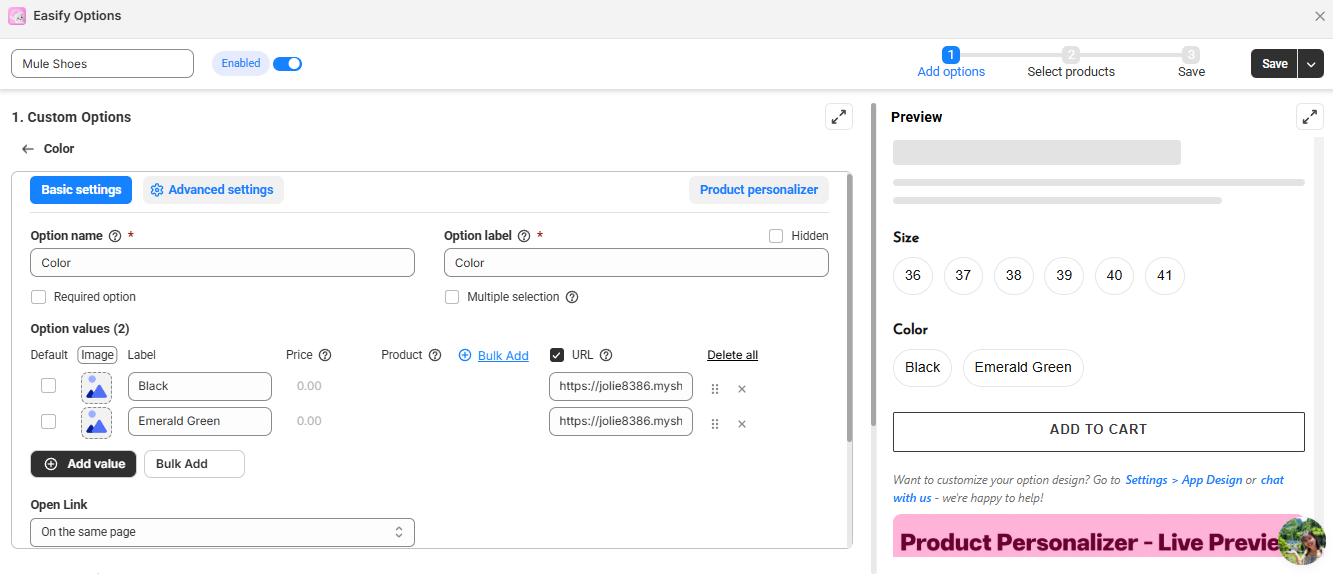
Easify Product Options: Creates a custom color selector linking to separate product URLs (requires paid plan for product linking feature)
Productify Groups: Allows assigning target URLs for variants to redirect to separate products
Combined Listings (Shopify Plus only): Native solution for enterprise-level stores
Status: The merchant confirmed interest in the code-based solution and received sample Liquid code. Testing in a development environment is strongly recommended before implementation.
Summarized with AI on October 26.
AI used: claude-sonnet-4-5-20250929.
My store has various products, and some products come in different colours. Currently, I have separate product pages for the different product colours.
How can I re-direct my variant selector to the corresponding product page URL? I want customers to be able to be on a product page and if the product comes in different colours, click through the other colours.
To manually associate color variants, for example using metafields or custom Liquid code. Utilize the swatches or buttons that link back to each color’s product url. You can use product in your product template. options_with_values and match each color to its corresponding handle link. It also allows for a unified multi-URL color selector experience.
you can use a product metafield to link related color products and render a clickable color selector on the product page that redirects to each color’s own URL. if you are proficient in editing theme code, i can share the code here. @majaa
Hi @majaa that’s an advanced theme customization , known as terms like: sibling-products, product familes, flat products , stand alone products, etc.
Stores on an enterprise shopify PLUS plan $$$ can use the combined listings app to achieve this behavior.
If you need this customization so your customers aren’t confused by sold out badges and to improve revenue then contact me for services.
Contact info in forum signature below .
ALWAYS please provide context, examples: store url, theme name, post url(s) , or any further detail in ALL correspondence.
You can try Easify Product Options – it lets you create a custom color selector that links each color to a separate product page URL. This way, customers can easily switch between colors while browsing, even if those colors are set up as separate products.
It looks and feels like a normal variant picker but works across multiple product URLs. The setup is quick, no coding required, and perfect for keeping your store clean and user-friendly. Here’s how it works:
This is the demo I set up, when you click into a color, it will redirect you to its own URL

 that’s an advanced theme customization , known as terms like: sibling-products, product familes, flat products , stand alone products, etc.