Topic summary
A user wants to modify their Shopify store’s mobile banner layout while keeping the desktop version unchanged. The issue involves repositioning banner content on mobile devices.
Solution Provided:
Two community members offered CSS code to adjust the mobile banner:
- Targets screens under 749px width
- Aligns content to bottom (
flex-end) - Centers text and sets minimum height to 49rem
- Code can be added to either the section’s Custom CSS or theme.liquid file
Follow-up Request:
The user successfully implemented the solution and asked about using a different image for mobile view.
Additional Solution:
Create two separate banner sections:
- One for desktop (hidden on mobile)
- One for mobile with different image (hidden on desktop)
- Use media queries to control visibility based on screen width
Status: Resolved with working solution and extended functionality provided.

Hi @BLmooi
You can add this code to Custom CSS of that section to change layout on mobile
@media (max-width: 749px) {
.banner__content { align-items: flex-end; min-height: 49rem; }
.banner__box { text-align: center; }
}
What it will look like

@media (max-width: 749px) {
.banner__content { align-items: flex-end; min-height: 49rem; }
.banner__box { text-align: center; }
}
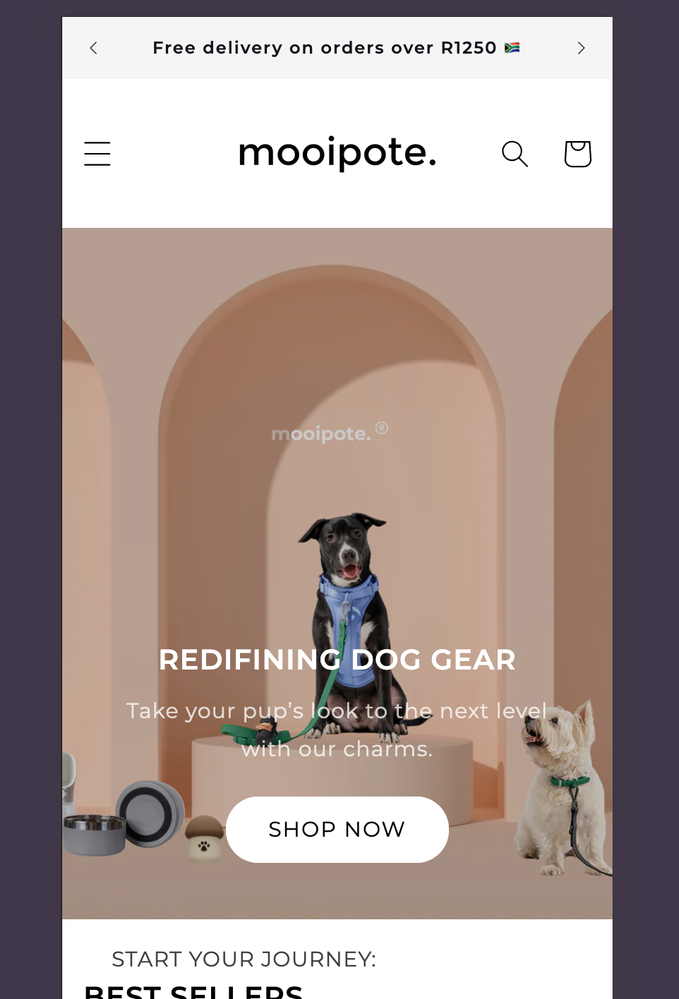
Go to online store ----> themes ----> go to three Dots ----> edit code ---->find theme.liquid files ----> place the code ---->
under the tag before the body ----->
if this code work please do not forget to like and mark it solution
THANK YOU SO MUCH! IT WORKED. Can I also add a different image on the
mobile view?
You can create another banner section for mobile so you can use another image for mobile, then add the following code according to the instructions below to hide the desktop section on mobile and vice versa.
Add this code to the Custom CSS of the desktop section.
@media (max-width: 749px) {
.banner { display: none; }
}
Add this code to Custom CSS of mobile section
@media (max-width: 749px) {
.banner__content { align-items: flex-end; min-height: 49rem; }
.banner__box { text-align: center; }
}
@media (min-width: 750px) {
.banner { display: none; }
}