Hello, I am creating a wholesale section of my site. Right now we are not using the ecommerce function for retail, but we would like to use it behind the wholesale login for wholesale orders. I removed the cart and login function from the site. Does anyone know how to add back just the “login” button on the retail site (and rename it Wholesale Login) and then have the cart show up only if logged in?
Hi @stevenunstick this is an advanced theme customization that varies wildly among themes.
If you do the research for “wholesale customization”/“membership customization” there are plenty of existing logic/code examples for you to do the work to build upon.
If instead you need this customization work done for you then contact me for services
Contact info in forum signature.
ALWAYS please provide context, examples: store url, theme name, post url(s) , or any further detail in ALL correspondence.
Hi @stevenunstick As you have mentioned that you have remove the code, so have you just deleted the code file or just the code from the file?
If you have just removed the code from the file then you can recover it, just go inside that file and then click on “Recent Changes” and click on original, you will get your code back.
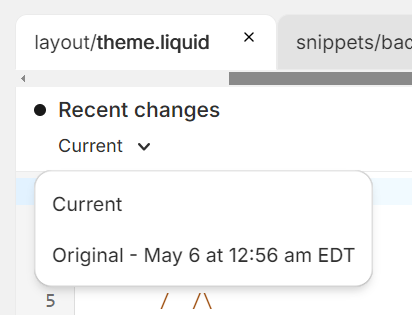
If you have deleted the file itself, then you can again download the theme from the theme store and find the code file from there and copy and paste the code from the downloaded theme to your current theme.
This will solve you 1 issue.
Regarding The cart icon, you need to add this if condition in your cart icon.
{% if customer %}

     // Your theme cart icon code.
{% endif %}
Hopefully it will help you. If yes then Please don’t forget hit Like and Mark it as solution!
Best Regards
Sahil