Hello. I am new to shopify and i paid the starter plan and i comes with spotlight theme by default. When i click to costumize the theme it only show me so so little options. Only to put a logo and to change background color, nothing else, not the header nor the footer.
Hello @Aldo11 Here’s the steps for creating the header and footer menu so you can link those navigation to the theme please check the below steps;
Step 1 -Open your spotlight store
Step 2 - Then go to navigation menu

Step 3 - Open navigation menu then open Main menu

Step 4 - Click the add menu item
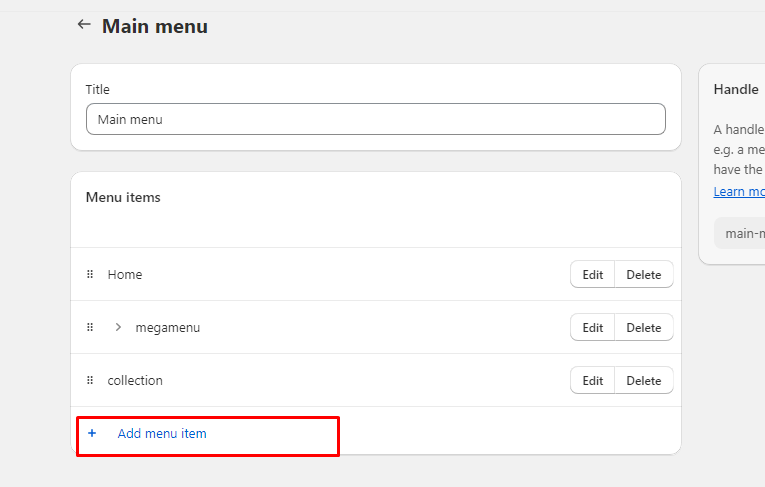
Step 5 - Open new dialog then create a menu as per your requirement

Step 6 - Then click to add
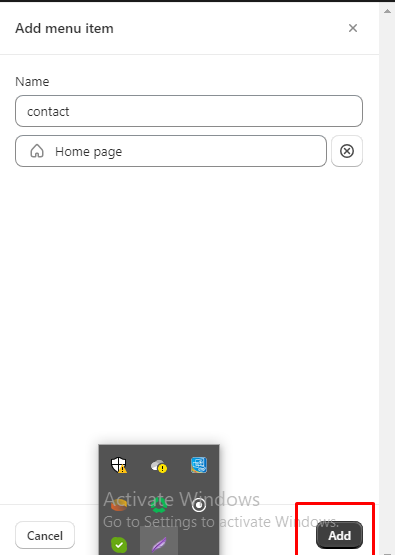
Step 7 - Then show this menu on main menu

Step 8 - Then click on save button

Step 9 - Then click on online store

Step 10 - then click to customization
Step 11 - click to header

Step 12- click the select Menu

Step 13- select the Main menu and click to select then save

Step 14 - then show menu on left side then click to save and preview

If You haven’t created footer menu then first create a footer same as header menu
Footer menu
Step 1- click to customise
Step 2- click to footer and add block

Step3 - click to Menu

Step 4 - Show footer menu
