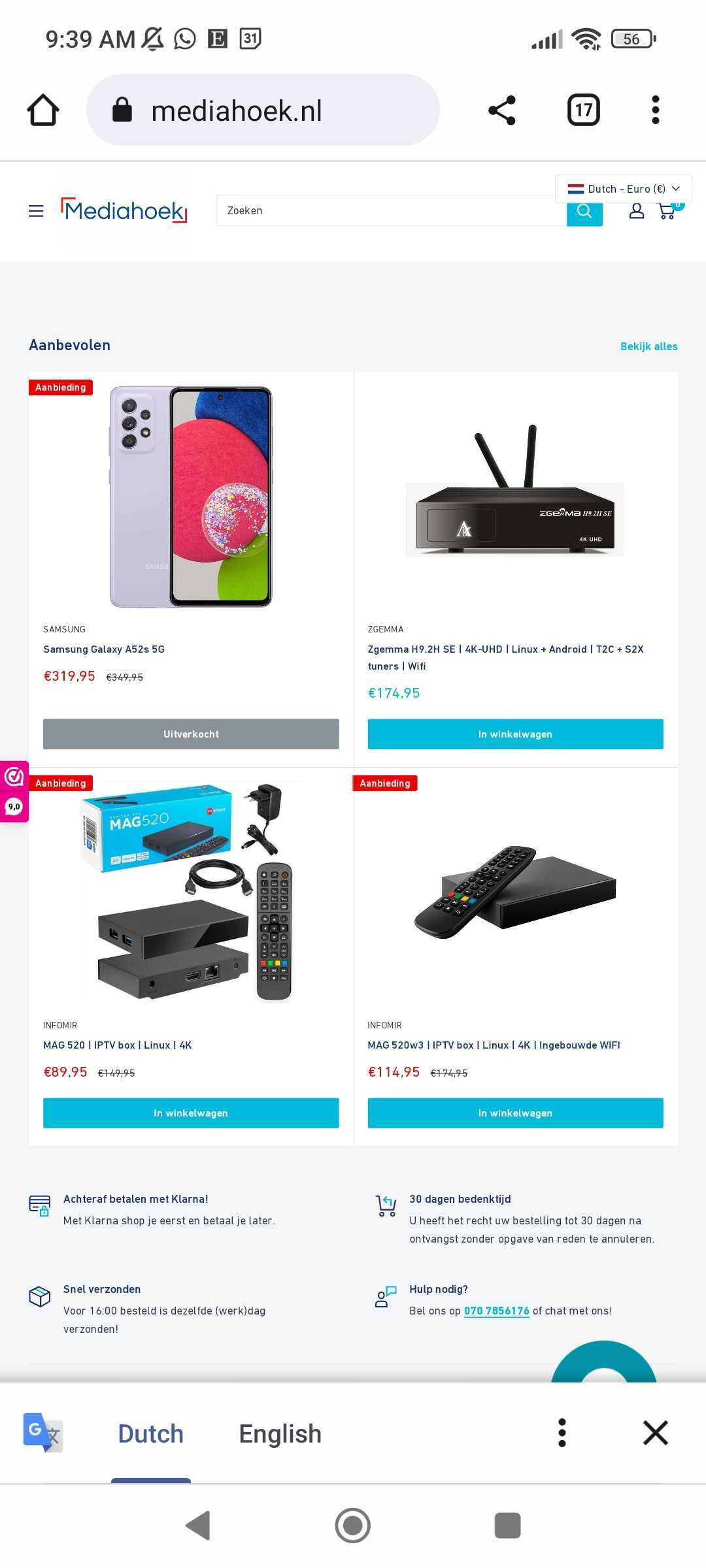
Hi,
I need some help. For my website https://mediahoek.nl mobile mode is not working.
Hi,
I need some help. For my website https://mediahoek.nl mobile mode is not working.
Hey @mediahoek !
Thanks for getting in touch.
I am sorry to learn that your store is not working on your mobile browser. Just to confirm, I have checked out your site on both mobile and desktop, and it works fine for me, see my screenshot below. I also had some colleagues check on their mobile devices, and they did not run into any issues. Have you had many reports of this so far?
I suspect this may be a local issue to your device. In this case, I would suggest some basic troubleshooting steps below and let me know if you’re still experiencing this issue?
I don’t know if you have anything planned for BFCM this year, but now is the time to make some preparations. BFCM is one of the biggest sales weekends of the year and sees the start of the holiday season as well. Every year, my go-to is this BFCM Checklist. It allows me to make sure that I am making the best use of my time and resources, and it really helps take the pressure off by starting early. It is well worth the read should you be interested!
I tried all of that. Everybody I checked with has this issue
Can you confirm with a screenshot how it looks for you.
See attachment for how it looks for me. It is a somewhat mobile version but
stretched as deaktop
I just saw you screenshot. This is what i get and it is wrong.
I can’t attach screenshot so I can’t show you. But you can reproduce the way it should be by opening the sute in chrome on windows and resize it mobile size, then you wil see how it should be.
Hi @mediahoek !
Not sure if you missed it, however I shared a screenshot of the mobile device visiting your website above. Just to clarify, you are able to visit your site via mobile however it shows as the desktop version rather than the mobile version, is that correct? I also did not receive your attachment, by the way!
Did you make any changes to your themes code lately or, or did you perhaps work with a developer to design your theme layout? What theme are you using and is it up to date?
Hoping to hear back from you soon!
I saw your screenshot. it is indeed wrong. That’s also what I get. It is
strange. It is not fully desktop or mobile mode. It is something in between.
I added screenshots to the e-mail. The added screenshot are as it should be
with a working mobile mode. I did this by opening the site on chrome on a
windows machine and resize the tab to mobile size. The it automatically
resize to the good mobile mode.
Also when i go to the theme editor in shopify on my mobile it also
displays fine
[image: image.png]
[image: image.png]
Hi @mediahoek !
Thanks for your response. Regrettably, your screenshots did not attach here, and I am unsure what you mean by they have been sent via email as I cannot accept emails here on the Community.
If you can provide a screenshot of how it looks for you and a screenshot of how it should look within the theme editor, then I can get a better scope of what the issue is. I’d also recommend troubleshooting the steps I mentioned above to dig into this deeper, as it is likely a display issue with your theme, and you’ll need to get in contact with the theme developers in that case. Let me know if you have tried them.