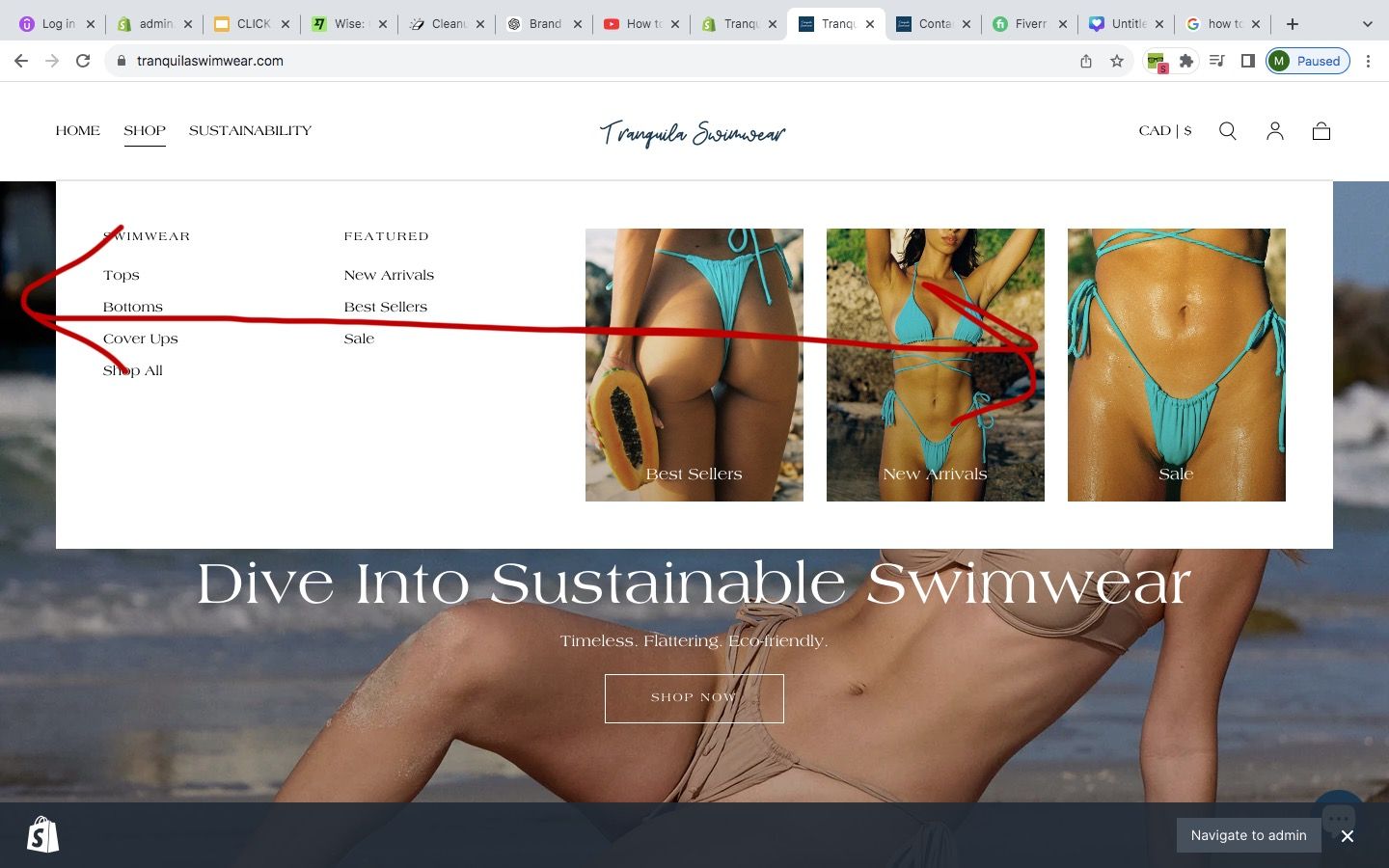
Every time my mouse is above that red line - the ‘SHOP’ submenu drops down. How can I fix this?? Thanks.
Topic summary
A user is experiencing an issue where their ‘SHOP’ submenu unexpectedly drops down whenever the mouse cursor hovers above a certain horizontal line near the top of any page on their Shopify store (tranquilaswimwear.com). A screenshot was provided showing the problematic red line boundary.
Attempted Solution:
- A community member suggested adding custom CSS code to the
header.liquidfile to fix the hover trigger area. - However, the proposed code snippet appears empty or incomplete in the conversation.
- The original poster confirmed the solution did not resolve the issue.
Current Status:
The problem remains unresolved, with the submenu still triggering incorrectly during mouse hover.
Hi @mayatranquila ,
Thank you for reaching out to the Shopify community. I’d be glad to assist you. Could you kindly share your store URL and
password (if it’s password-protected) so I can review it and provide you with an update?
Hi @mayatranquila ,
Go to Online Store, then Theme, and select Edit Code.
Search for header.liquid file add the provided code at the end of the file.
that did not work ![]()
