does anyone know of a way to customise the report to include a status column?
the report in theory looks great but falls down when it is still including items that are no longer on sale.
i’ve tried to filter items include those items that have quantities greater than zero but as the report is a few days old, i’m still getting inaccurate data.
many thanks
Hi @dogmeatsbone ,
This is Theodore from PageFly - Shopify Page Builder App
Shopify reports don’t allow adding custom columns like “status” to exclude inactive products. Here are some workarounds:
-
Filter Existing Reports: Use available filters in inventory reports, like “Available quantity” greater than zero, to exclude out-of-stock items.
-
Product Availability: Check the “Product Availability” section within product listings for individual status.
-
Custom Reports (Apps or Exports):
- Use third-party apps that offer report customization and might allow adding a “status” column based on your needs.
- Export product data to a spreadsheet and create custom filters or formulas to categorize them by stock availability and sales status.
Best regards,
Theodore | PageFly
2 Likes
Hello @dogmeatsbone ,
Unfortunately, Shopify reports do not offer the flexibility to add custom columns like “status” and other data to your reports. If your business relies on custom data for analysis and decision-making, consider using a reporting tool.
Check out Report Pundit with a free 14-day trial. We can also help you set up any custom reports you need and schedule them to save time spent on reporting.
For easy data analysis,
Team Report Pundit
1 Like
Hey, @dogmeatsbone
This is Denys from Mipler: Custom Reports.
Nice to connect with you here!
Unfortunately, as mentioned earlier, achieving this with Shopify’s native functionality isn’t possible.
However, I’d like to recommend checking out the functionality of our application.
You can find it by following the link below: https://apps.shopify.com/advanced-reports
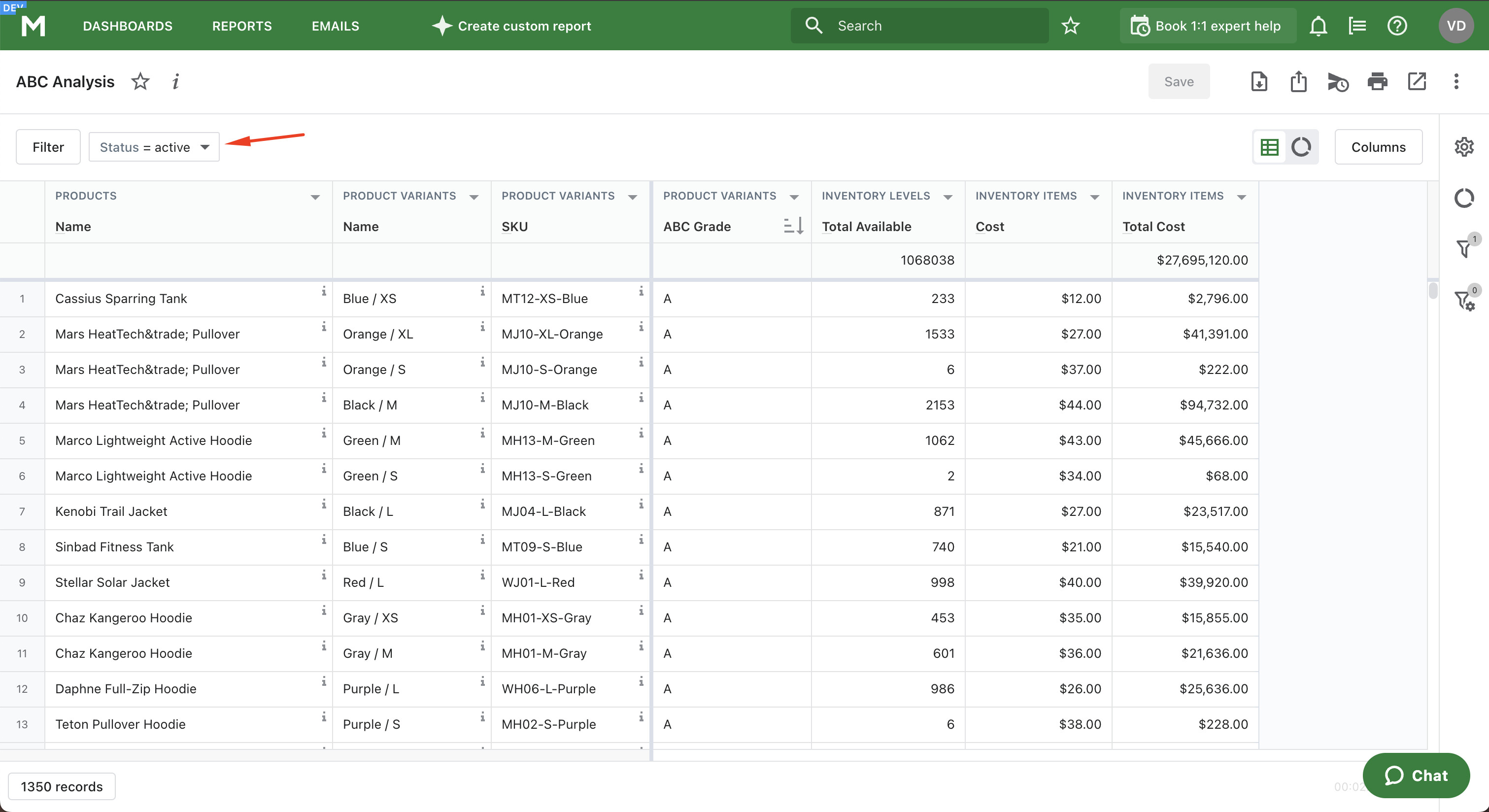
Our talented developers have created the ABC analysis report, allowing you to easily filter by the required product status:
We offer a free 7-day trial period, and our support team would be delighted to create any report tailored specifically for you.
Just send us a request and give us a little time to provide you with a complete solution.
Looking forward to hearing from you soon!