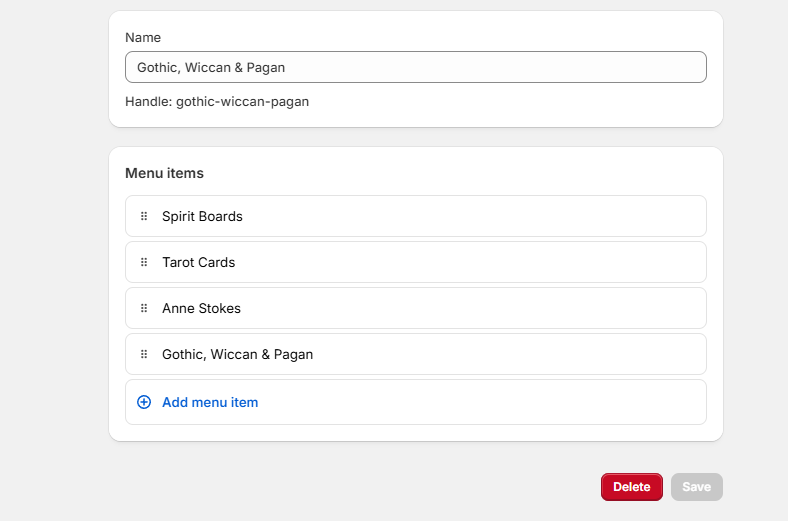
i have Dawn temp, and I have added section called Gothic, Wiccan & Pagan and i want to add a sub category called
Tarot cards, its under Gothic, Wiccan & Pagan but not showing on the shop, but i did get one to work, but no more
spirit boards show up but none of the others
DaisyVo
2
Hi @Joe_Miotello
It looks like your menu setup may not be configured correctly for subcategories under “Gothic, Wiccan & Pagan.”
From the image, “Tarot Cards” and “Spirit Boards” appear as separate top-level categories instead of subcategories under “Gothic, Wiccan & Pagan.”
To fix this:
- Try dragging “Tarot Cards” slightly to the right under “Gothic, Wiccan & Pagan.”
- Verify navigation in Shopify to ensure the subcategories are correctly nested.
- Make sure the correct menu is assigned in your theme settings.
- Clear cache & check in incognito mode (sometimes changes do not reflect immediately)
Let me know if the issue persists!
Best regards,
Daisy.
hi there
well got it going-lol, the thing is i don’t know how, why can we not just do a collection and then add page underneath like what i use in Webador
is just so easy
Hi There
well i cant do it again, here is where what have done but no showing on site
as you can see,not all showing
DaisyVo
6
Hi @Joe_Miotello
Maybe it’s the cache issue. Shopify may still be caching an old version of the menu so you can try checking on different browsers or device
I am willing to check it for you if you can share the store’s URL.
Besides, there are some other potential reasons for these missing:
- Theme Menu Settings
- Some older versions of the theme may have a limit on number of sub-menu or a default dropdown height
- To test, try switching to a different free Shopify theme and see if the issue persists.
- Broken Links or Misconfiguration
- Go to Online Store > Navigation and click on each missing item.
- Ensure they have correct links and are properly saved.
- Hidden CSS Rules
- Check for any custom CSS/JavaScript that might be hiding menu items
- In your code editor, look for rules like “display: none;” or “max-height”
Let me know if these steps help or if you want me to guide you further
Best regards,
Daisy.